# Welcome

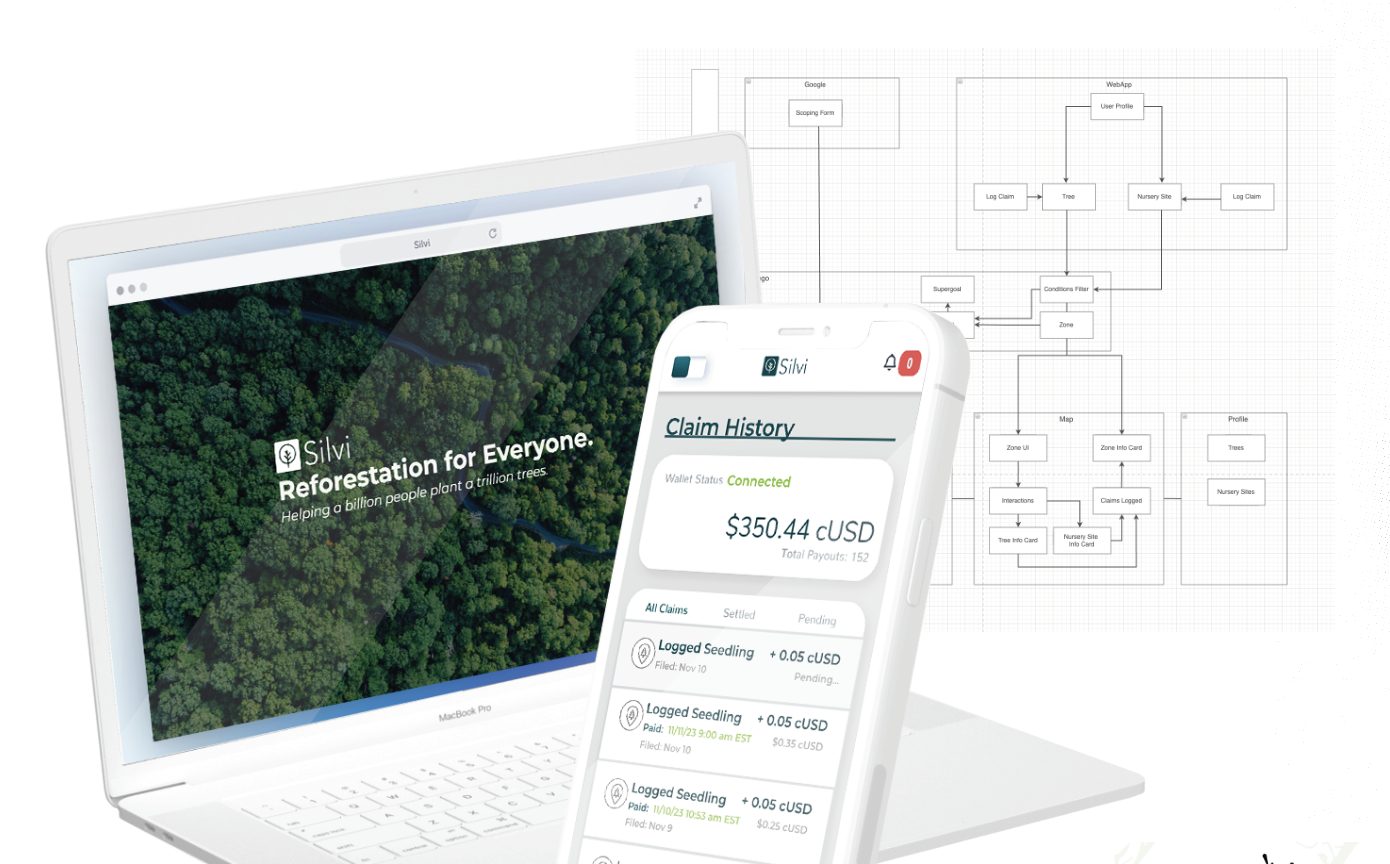
Welcome to the Silvi Documentation Site.

This site serves as a resource to help you understand the system we are building at Silvi. As we improve our system, this document will continue to evolve.

Below are a few pages that have been built to help you connect with our work.

<table data-view="cards"><thead><tr><th></th><th></th><th></th><th data-hidden data-card-target data-type="content-ref"></th><th data-hidden data-card-cover data-type="files"></th></tr></thead><tbody><tr><td></td><td>Get Started with the <strong>Silvi App User Guide</strong></td><td></td><td><a href="/silvi-app-user-guide/getting-started">Getting Started</a></td><td><a href="https://2171891961-files.gitbook.io/~/files/v0/b/gitbook-x-prod.appspot.com/o/spaces%2FXVnWCpT7Fl73aCYJVw74%2Fuploads%2Fgit-blob-64b4859797f02bcedc5ec24675852525b5c91b7c%2FScreenshot%202024-08-22%20at%202.39.15%E2%80%AFPM.png?alt=media">Screenshot 2024-08-22 at 2.39.15 PM.png</a></td></tr><tr><td></td><td>View <strong>Resources</strong> to learn more about taking environmental action. </td><td></td><td><a href="/resources/local-reforestation-guide">Local Reforestation Guide</a></td><td><a href="https://2171891961-files.gitbook.io/~/files/v0/b/gitbook-x-prod.appspot.com/o/spaces%2FXVnWCpT7Fl73aCYJVw74%2Fuploads%2FrmnTSNNPB2VSYYhSPwx7%2F20230417_GustavoBrichi_forestry-engineer_teaching-school-kids_IPE_NazarePaulista_SP_Brazil_LucasNinno_DialogoChino.png?alt=media&amp;token=9c0d9f04-c5b6-497e-bfcf-fd0261dbec1a">20230417_GustavoBrichi_forestry-engineer_teaching-school-kids_IPE_NazarePaulista_SP_Brazil_LucasNinno_DialogoChino.png</a></td></tr><tr><td></td><td>Learn how to contact a Silvi member in <strong>Troubleshooting</strong></td><td></td><td><a href="/troubleshooting/contact">Troubleshooting</a></td><td><a href="https://2171891961-files.gitbook.io/~/files/v0/b/gitbook-x-prod.appspot.com/o/spaces%2FXVnWCpT7Fl73aCYJVw74%2Fuploads%2Fgit-blob-d9218d6eb67ad3533453254ebd12da3ce5e7adc1%2FScreenshot%202024-12-16%20at%206.27.13%E2%80%AFPM.png?alt=media">Screenshot 2024-12-16 at 6.27.13 PM.png</a></td></tr></tbody></table>


# Getting Started

Welcome to the Silvi App User Guide. This document explains how to make an account, how to use the app and how to earn.

## What is the Silvi App?

[Silvi](https://app.silvi.earth/) is a Monitoring, Reporting, and Verification (MRV) Tool for Reforestation Projects around the world. **We built this app to help reforestation agents earn more for their work and motivate others to join the movement.**

### Why it matters:

As a tool, Silvi’s MRV technology ensures the tracking of tree growth, health, and the success of reforestation efforts, providing valuable data for local and global environmental initiatives. In turn, this data can provide inspiration for citizens interested in reforestation, making it easier for them to get involved and get rewarded for their efforts.

### With the Silvi App you can...

* Register [Trees](/silvi-app-user-guide/registering-a-tree) or [Seedbeds](/silvi-app-user-guide/registering-a-seedbed) and[ Potted Beds](/silvi-app-user-guide/registering-a-potted-bed) at Nursery Sites
* [Log claims](/silvi-app-user-guide/logging-claims) (take images and upload forms about trees)
* [Connect a web3 wallet](/silvi-app-user-guide/connecting-a-wallet) to receive funds for completed claims
* View & share a map with [history of claims](/silvi-app-user-guide/claim-history-and-payouts) and associated data

## Joining the Silvi Initiative

In the open beta stage, we are still manually vetting and setting up payable projects with Silvi. Please reach out through our website, email, or socials, to set up a meeting with a Silvi team member.

### The Onboarding Process <a href="#the-onboarding-process" id="the-onboarding-process"></a>

When a project is onboarded to Silvi, an administrative team member will set up a ‘methodology’ for your project. Think of methodologies as contracts, which promise a certain amount of payout in exchange for services or goods provided.

Through the Silvi app, users are responsible for registering and monitoring assets such as [trees](http://localhost:3000/Silvi-docs/docs/User%20Guide/Registering%20a%20Tree), [seedbeds](http://localhost:3000/Silvi-docs/docs/User%20Guide/Registering%20a%20Seedbed), or [potted beds](http://localhost:3000/Silvi-docs/docs/User%20Guide/Registering%20a%20Potted%20Bed), and [logging claims](http://localhost:3000/Silvi-docs/docs/User%20Guide/Logging%20Claims) on said assets to fulfill the requirements outlined in the methodology (contract), and receive the agreed-upon compensation.

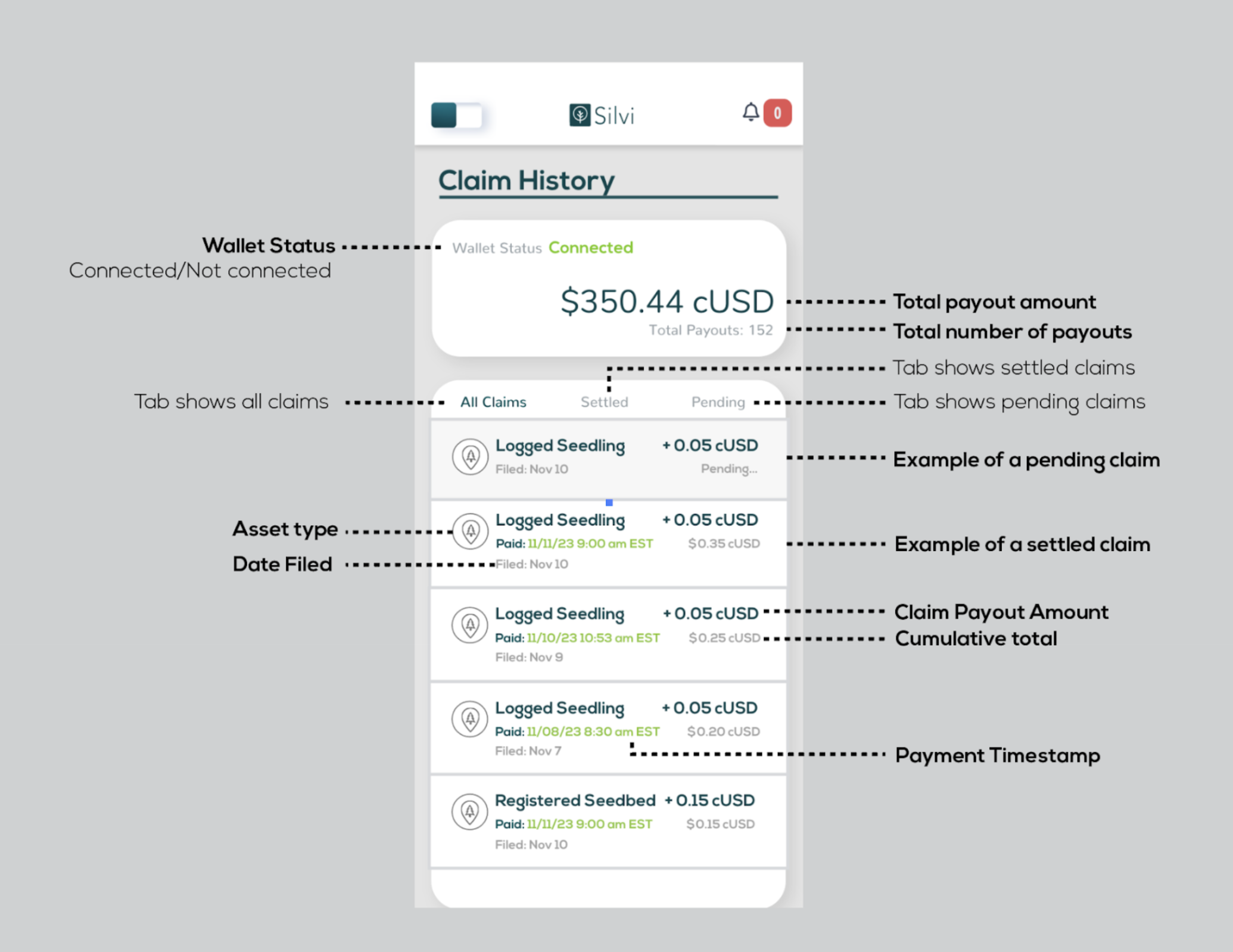
Once users have logged claims, they will be able to view the status of the claim in claim history. In claim history users may also view the amount of total funds that have been paid, through Silvi.

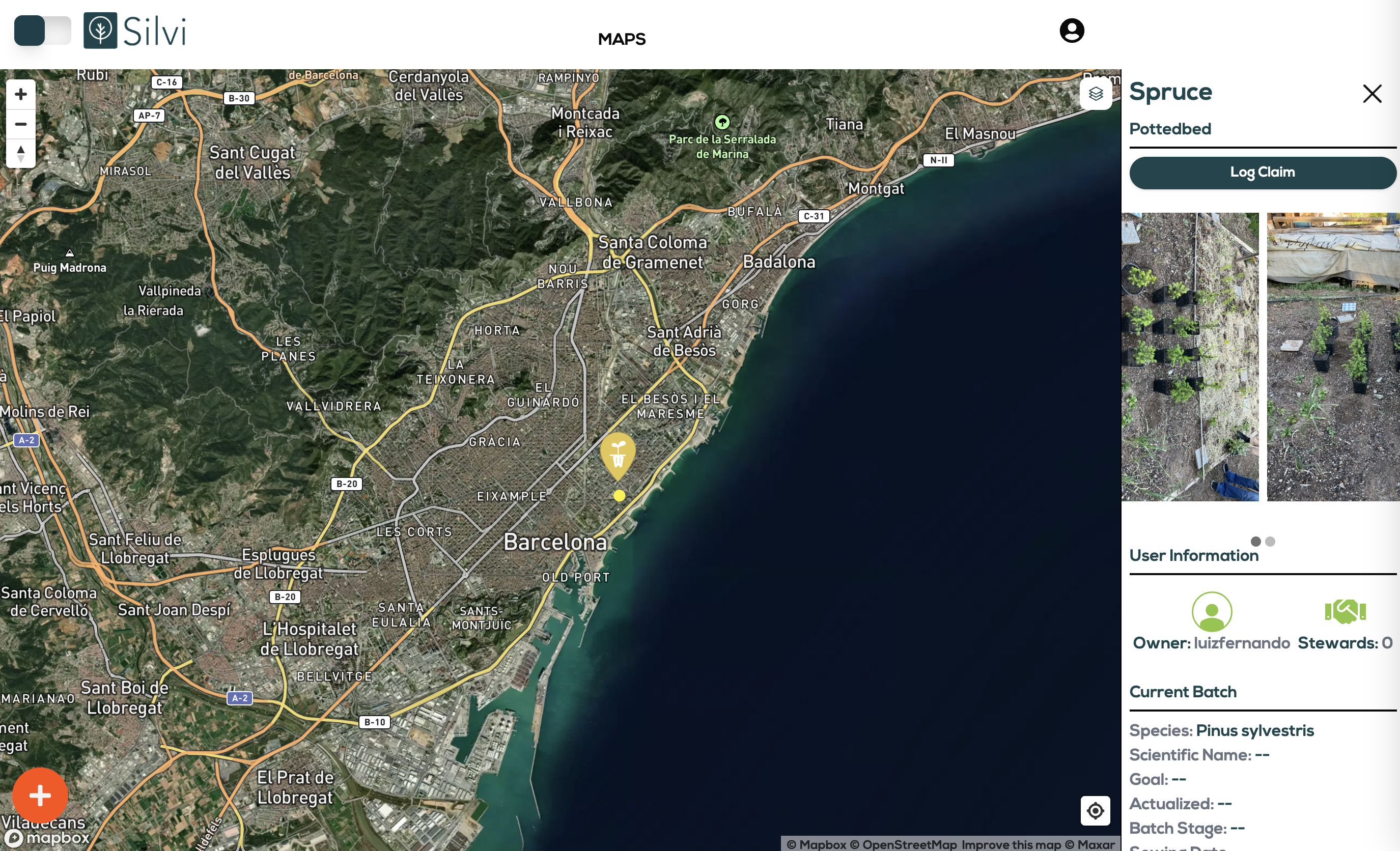
As a user, your projects and assets registered will be publicly viewable on the home map page, so Silvi users around the world can see the tangible impact you have made in reforestation, and the steps you took to get there.

## Registration

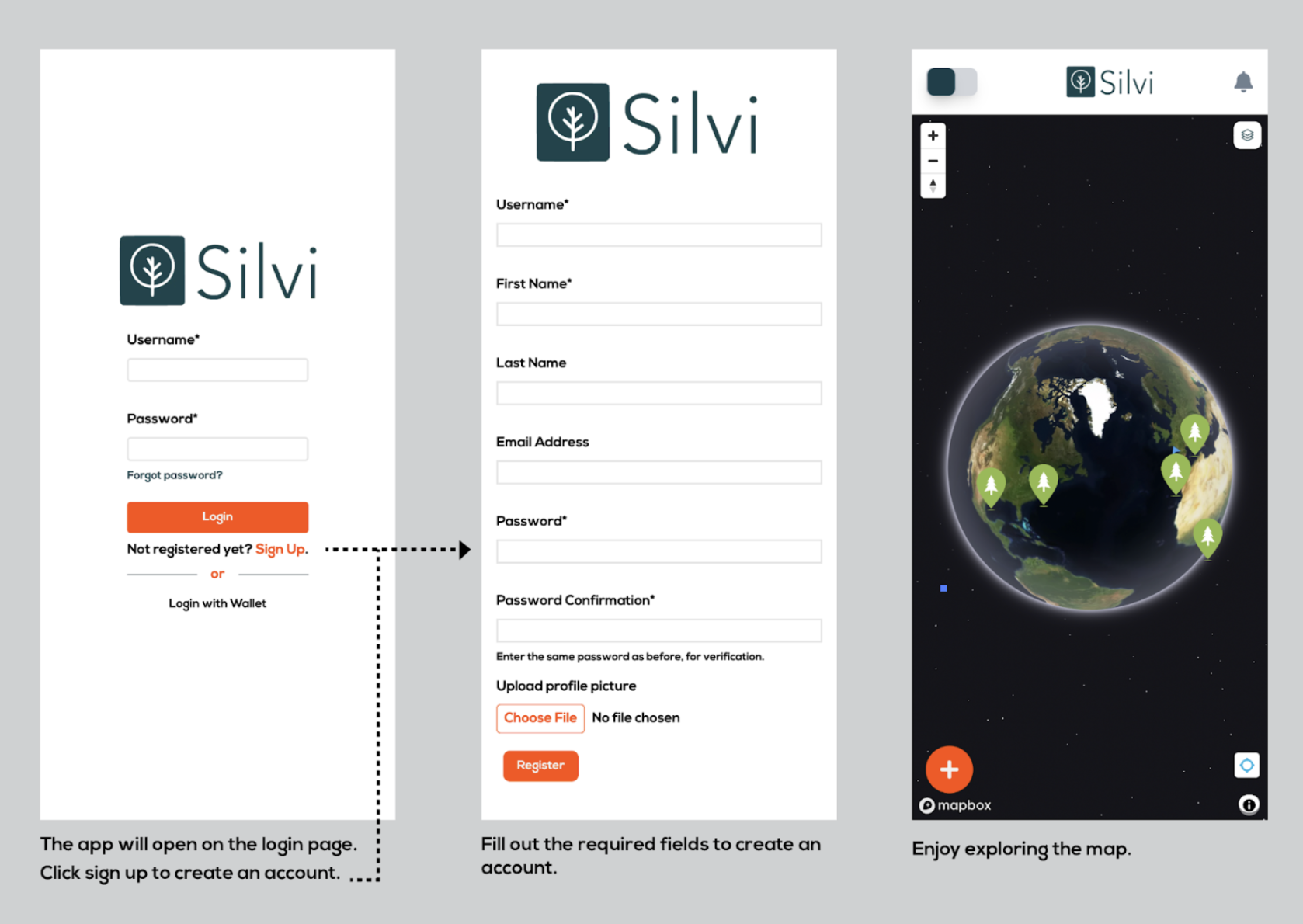
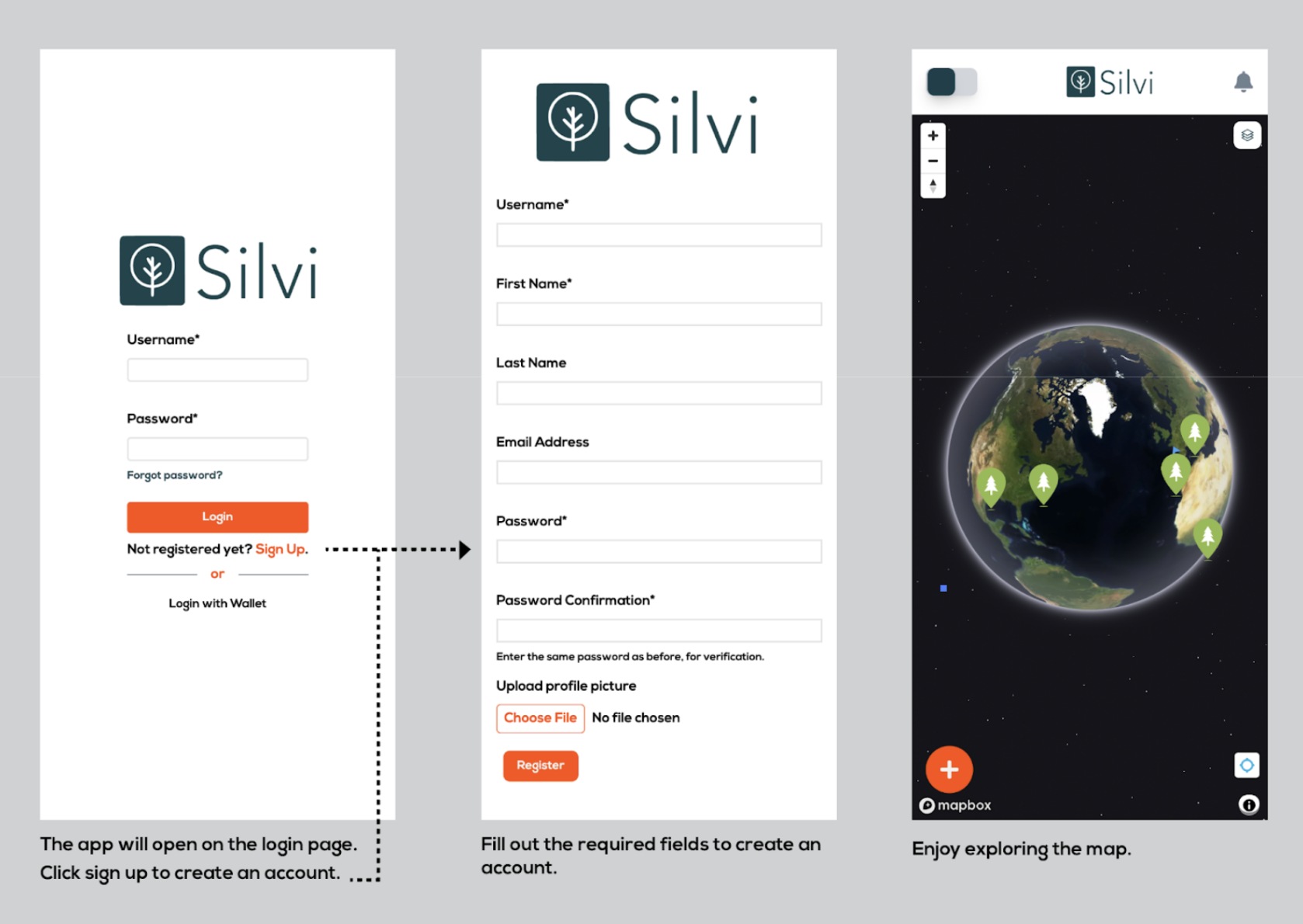
How to register an account on the app.

1. The app will open on the login page. Click sign up to create an account.
2. Fill out the required fields to create an account.
3. Enjoy exploring the map.

<figure><img src="https://2171891961-files.gitbook.io/~/files/v0/b/gitbook-x-prod.appspot.com/o/spaces%2FXVnWCpT7Fl73aCYJVw74%2Fuploads%2Fgit-blob-b92151fc99d9f79824a2dc398d6eb89236782aef%2FRegistration.png?alt=media" alt=""><figcaption></figcaption></figure>


# Interacting with the Map

Below is a diagram of the different buttons on the map/homepage and what they do.

<figure><img src="https://2171891961-files.gitbook.io/~/files/v0/b/gitbook-x-prod.appspot.com/o/spaces%2FXVnWCpT7Fl73aCYJVw74%2Fuploads%2Fgit-blob-b92151fc99d9f79824a2dc398d6eb89236782aef%2FInteracting%20with%20the%20map.png?alt=media" alt=""><figcaption></figcaption></figure>


# Connecting a Wallet

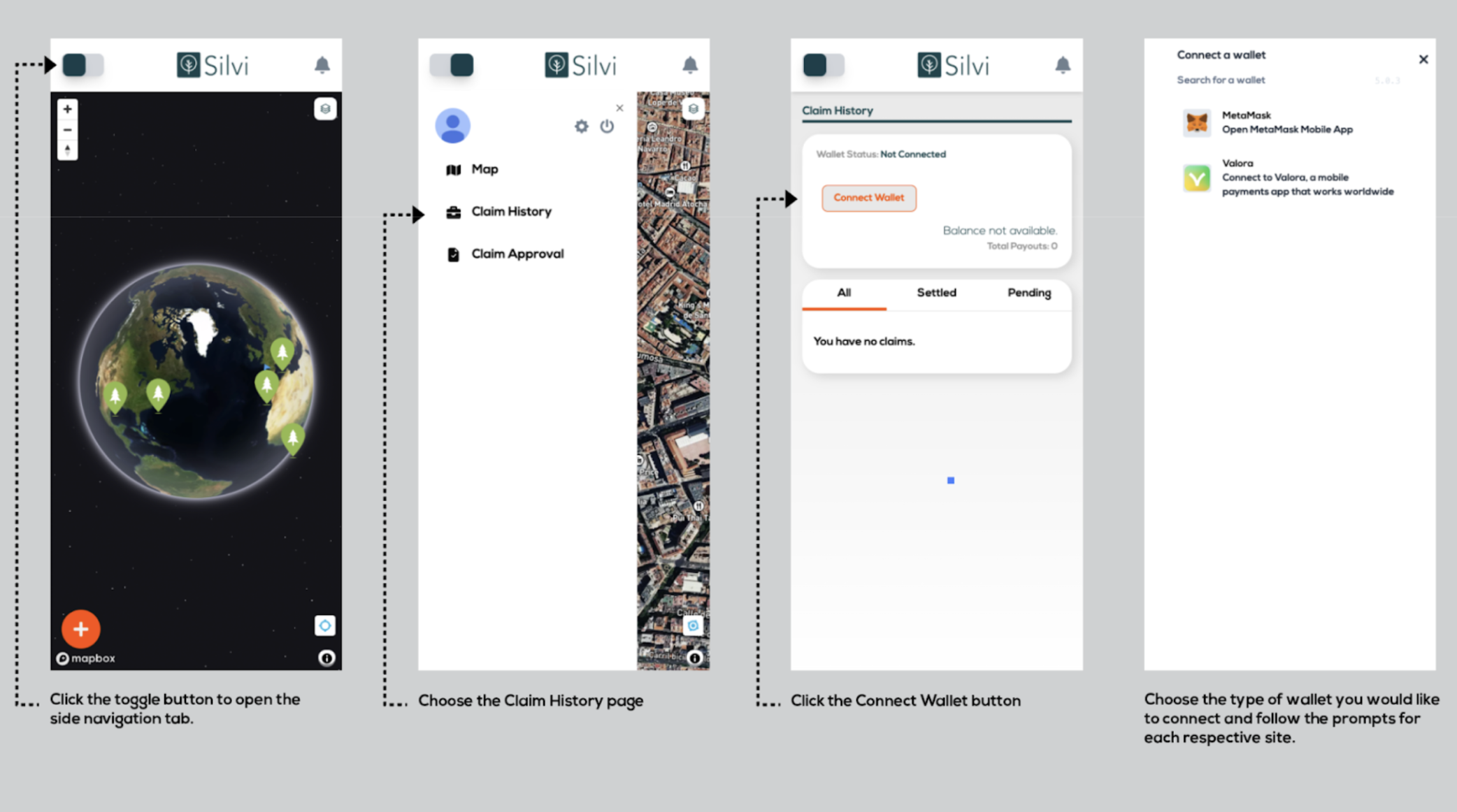
In order to get paid through Silvi, you must connect a Celo compatible wallet.

[Introduction to Web3](https://medium.com/@chaincom/a-beginners-guide-to-web3-865efb957354)

[Web3 Wallet Options Explained](https://bitpay.com/blog/types-of-crypto-wallets/)

{% hint style="info" %}
If you are unfamiliar with **web3**, use the links above to learn more.
{% endhint %}

1. **Click** the `toggle button` to open the side navigation tab.
2. **Choose** the `Claim History Page`
3. **Click** the `Connect Wallet button`
4. **Choose** the type of wallet you would like to connect and follow the prompts for the respective wallet. Silvi is currently issuing payouts as cUSD (stable dollar on Celo) so make sure you have a Celo compatible wallet on MetaMask or Valora. To add celo to your MetaMask, [follow these steps](https://celo.academy/t/3-simple-steps-to-connect-your-metamask-wallet-to-celo/84).

*Silvi is currently issuing payouts as cUSD (stable dollar on Celo) so make sure you have a Celo compatible wallet on MetaMask or Valora. To add celo to your MetaMask,* [*follow these steps*](https://celo.academy/t/3-simple-steps-to-connect-your-metamask-wallet-to-celo/84)*.*

<figure><img src="https://2171891961-files.gitbook.io/~/files/v0/b/gitbook-x-prod.appspot.com/o/spaces%2FXVnWCpT7Fl73aCYJVw74%2Fuploads%2Fgit-blob-1c5a9437d2d48dea941a2d0bb45337e9b59e4358%2FConnecting%20a%20Wallet%20.png?alt=media" alt=""><figcaption></figcaption></figure>

{% hint style="info" %}
As part of a special campaign, users will be able to connect a wallet automatically through the **Opera Minipay browser.**
{% endhint %}


# Updating Profile

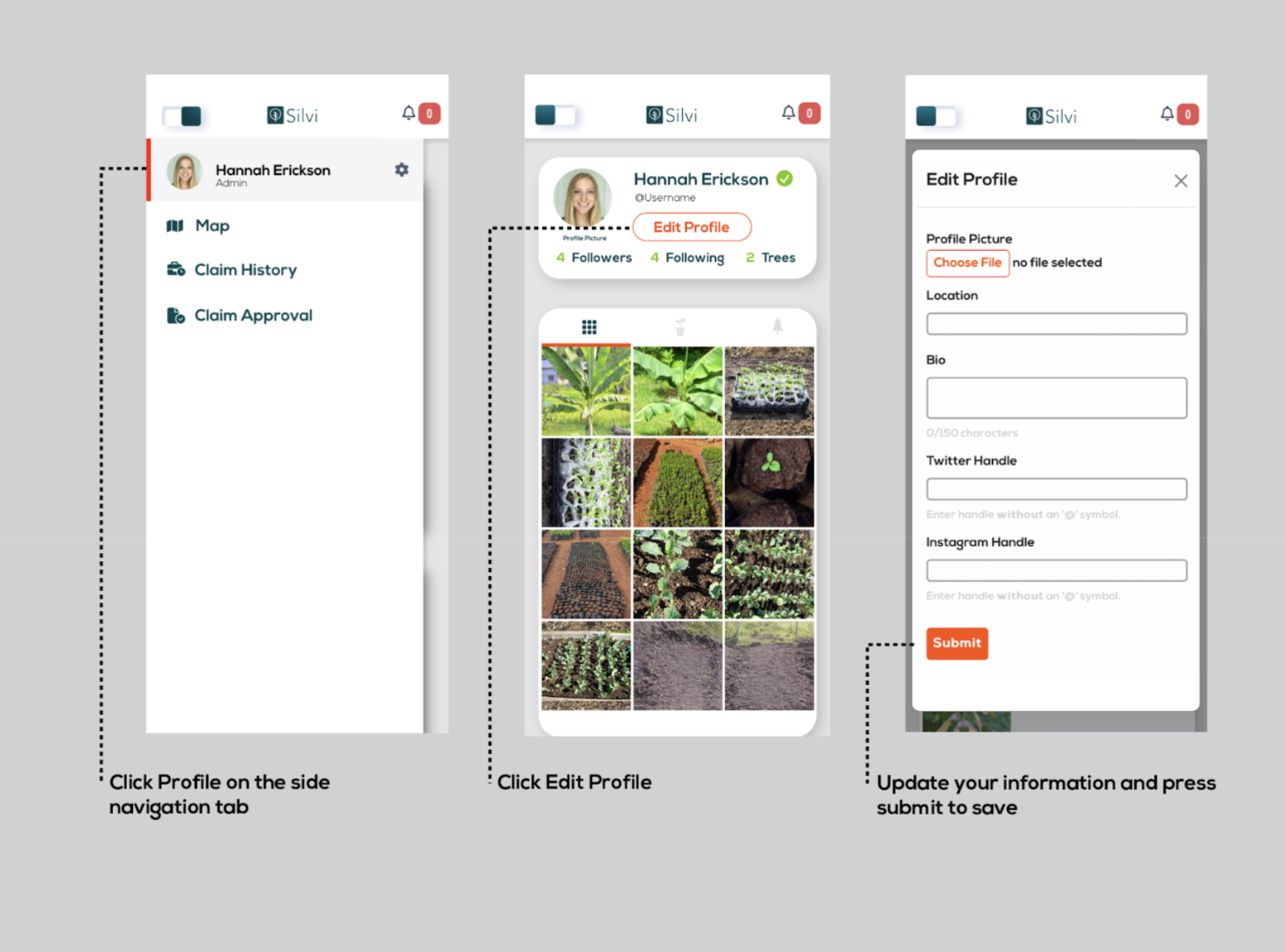
This app is more than just an MRV tool. At Silvi, we are building a network of reforestation agents. Put your best face forward by updating your Profile info.

1. **Click** `Profile` on the Side Navigation Tab
2. **Click** `edit profile`
3. **Update** your profile information and **press** `submit` to **save.**

<figure><img src="https://2171891961-files.gitbook.io/~/files/v0/b/gitbook-x-prod.appspot.com/o/spaces%2FXVnWCpT7Fl73aCYJVw74%2Fuploads%2Fgit-blob-13f291fd9635269500e2d7c55b73caa73dc73a77%2FUpdate%20Profile.png?alt=media" alt=""><figcaption></figcaption></figure>

In this version of Silvi profile pages, images you upload to the app appear in chronological order. Use the tabs to filter for tree photos only, or photos from nursery sites.


# Registering a Tree

## Tree Types Explained

**New Planting:** This type of tree should be registered with Silvi immediately after planting.

**Young Tree:** A young tree is a tree that has been recently planted and has not yet reached maturity.

**Mature Tree:** A mature tree can be registered for biodiversity monitoring or to register a Mother Tree which produces seeds and seedlings that can be planted in order to produce seedlings/saplings.

{% hint style="info" %}
**You can register any type of tree at any time** but you can only receive monetary rewards for trees that follow the methodologies prescribed for your project.
{% endhint %}

## Steps to Register Trees

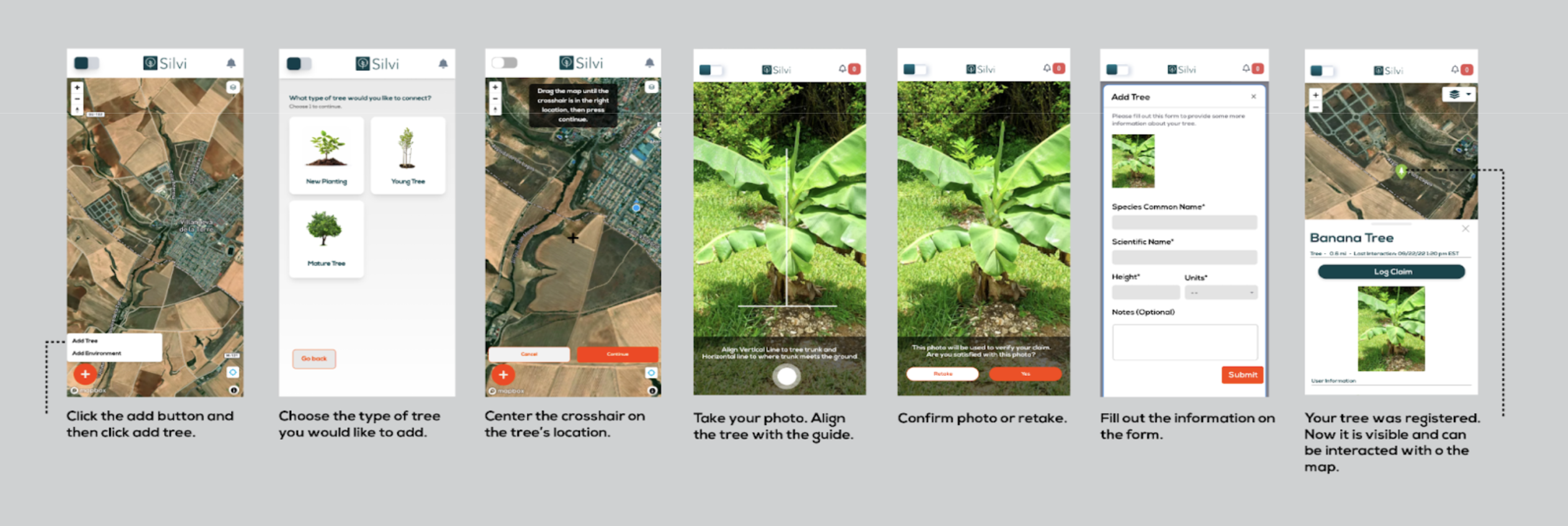
1. **Click** the `add button` and then **click** `add tree`
2. **Choose** the `type` of tree you would like to add
3. Center the crosshair on the tree’s location\*
4. **Take** your photo
5. **Align** the `tree` with the `guide`
6. **Confirm** photo or **retake**
7. Fill out the information on the `form`

<figure><img src="https://2171891961-files.gitbook.io/~/files/v0/b/gitbook-x-prod.appspot.com/o/spaces%2FXVnWCpT7Fl73aCYJVw74%2Fuploads%2Fgit-blob-69710c07ec55676bc9e4c2eed80368c66aa6cdfa%2FRegistering%20a%20Tree.png?alt=media" alt=""><figcaption></figcaption></figure>

{% hint style="success" %}
If a green confirmation banner appears, **your tree was registered.** Now it is visible and can be interacted with on the map.
{% endhint %}

{% hint style="info" %}
If you would like to **change the location of a tree** or if you have **uploaded it by mistake,** you should contact your administrator.
{% endhint %}

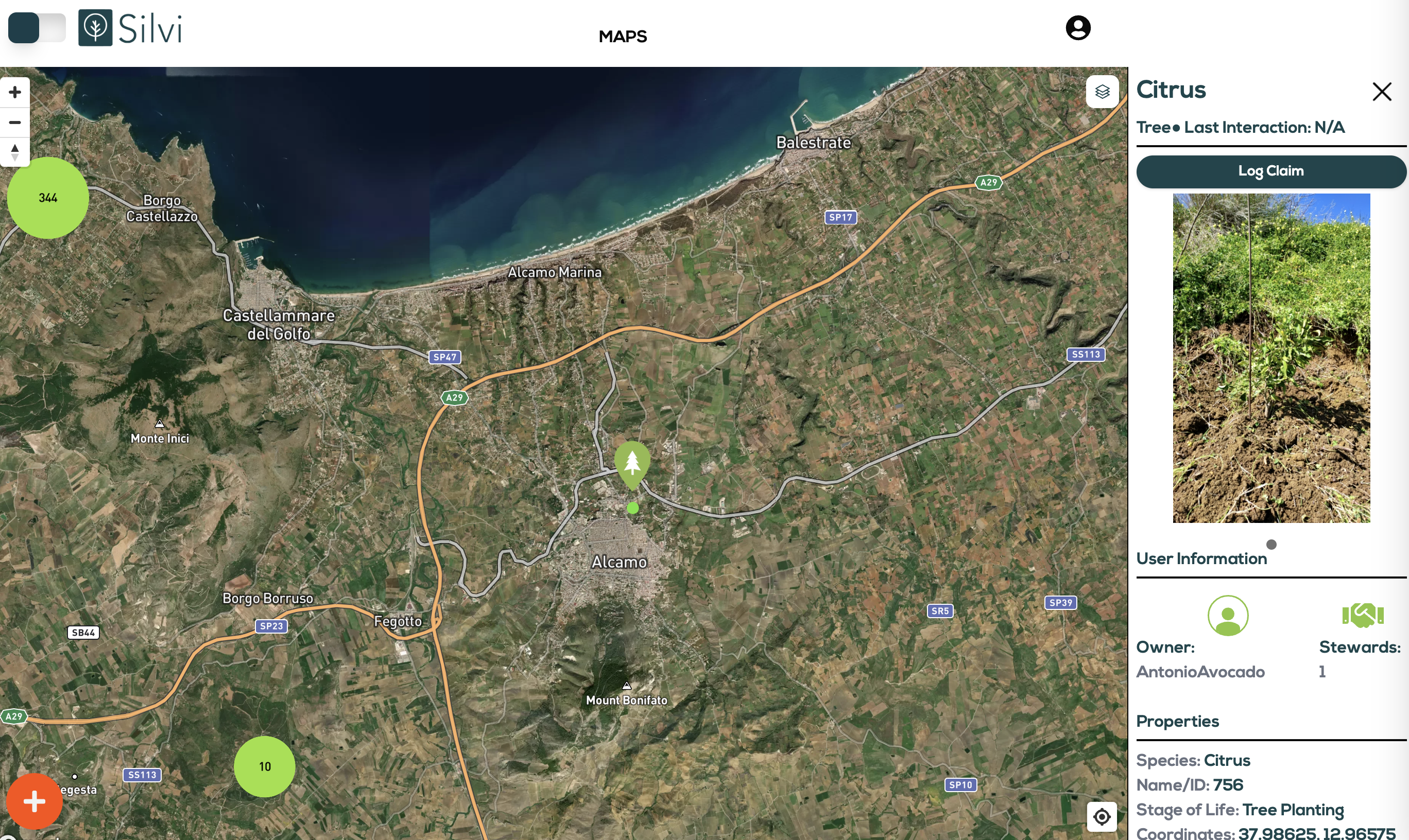
Trees are marked on the map with green icons. When the globe is zoomed out they are grouped, counted, and marked with larger green circles.

<figure><img src="https://2171891961-files.gitbook.io/~/files/v0/b/gitbook-x-prod.appspot.com/o/spaces%2FXVnWCpT7Fl73aCYJVw74%2Fuploads%2Fgit-blob-3edc5025396dd482a3743fc29aaec03e4be88634%2FTree%20Registered.png?alt=media" alt=""><figcaption></figcaption></figure>


# Registering a Seedbed

## What is a seedbed?

**A seedbed is a type of nursery site.** A seedbed is a patch of soil that has been prepared with optimal conditions to help farmers germinate a large quantity of seeds. Once the seeds grow into young plants, they are referred to as seedlings.

{% hint style="info" %}
**You can register a seedbed at any time** but you can only recieve monetary rewards for seedbeds that follow the metholodologies prescribed for your project.
{% endhint %}

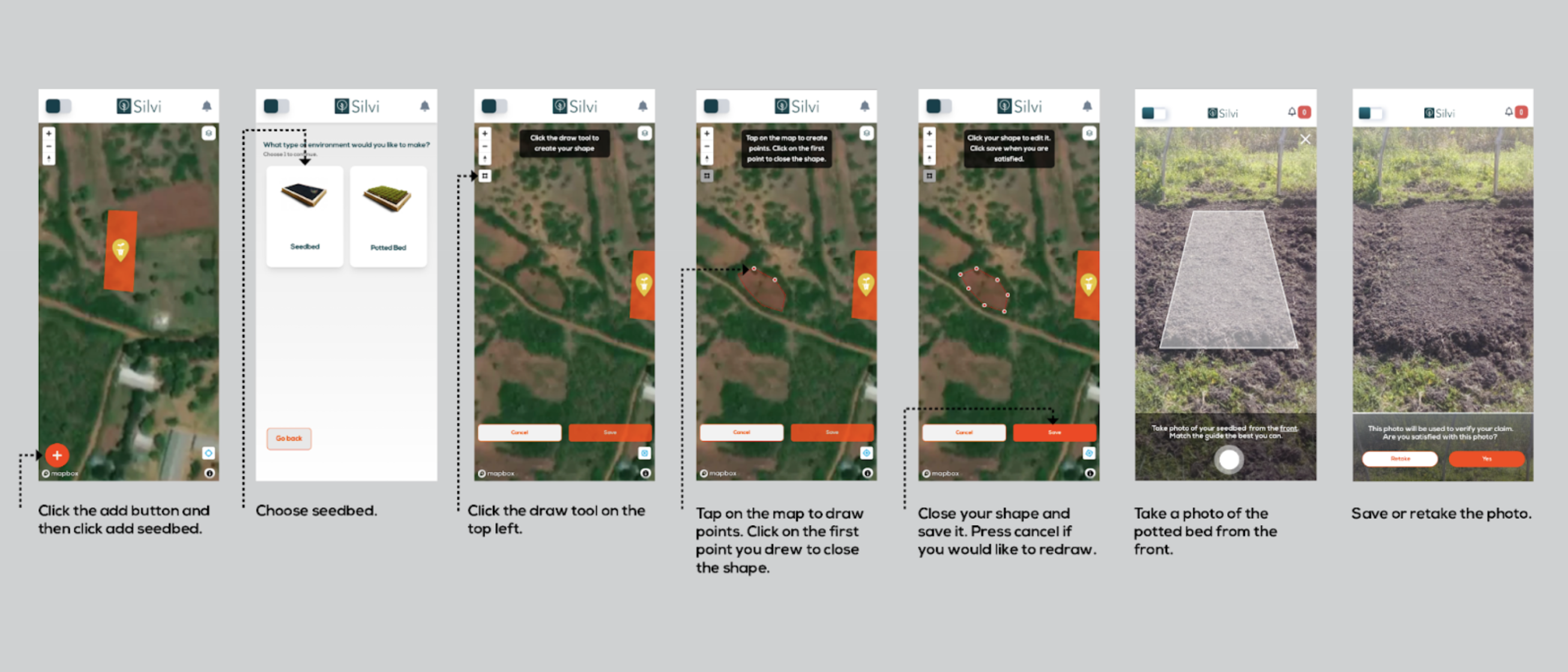
## How to Register a Seedbed

1. **Click** the `add button` and then **click** `add seedbed`
2. **Choose** `seedbed`
3. **Click** the `draw tool` on the top left
4. **Tap** on the `map` to draw points
5. **Click** on the `first point` you drew to **close the shape**
6. Close your shape and save it. **Press** `cancel` if you would like to redraw
7. **Take** a photo of seedbed from the front
8. `Save` or `retake` the photo.

<figure><img src="https://2171891961-files.gitbook.io/~/files/v0/b/gitbook-x-prod.appspot.com/o/spaces%2FXVnWCpT7Fl73aCYJVw74%2Fuploads%2Fgit-blob-2d2230ee89c324f2381693f3fd2fb2937b90f5ab%2FRegistering%20a%20Seedbed.png?alt=media" alt=""><figcaption></figcaption></figure>

{% hint style="success" %}
If a green confirmation banner appears, **your seedbed was registered.** Now it is visible and can be interacted with on the map.
{% endhint %}

{% hint style="info" %}
If you would like to **change the location of your nursery site** or if you have **uploaded it by mistake,** you should contact your administrator.
{% endhint %}

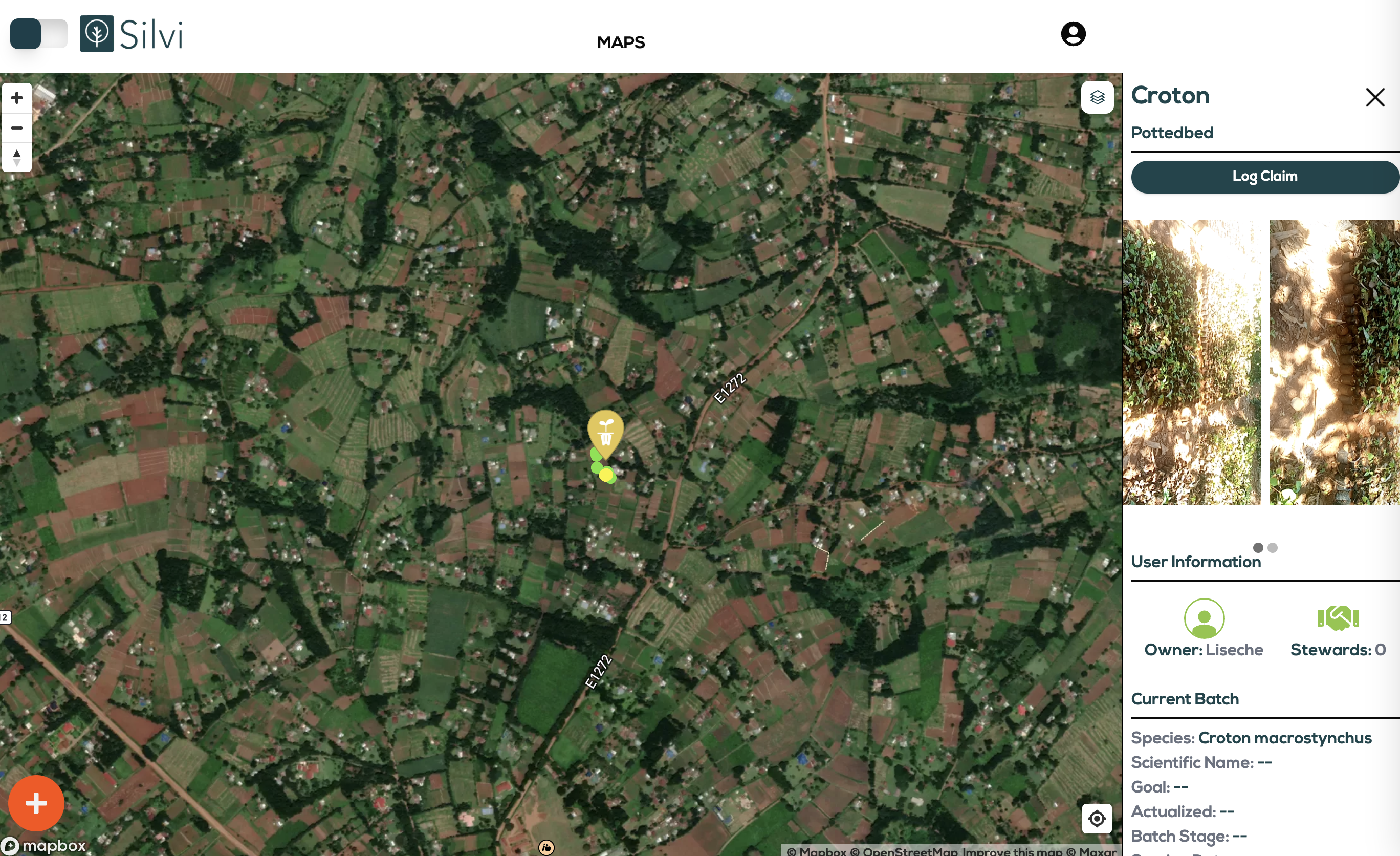
Seedbeds and Potted beds are marked on the map with yellow icons. When the globe is zoomed out they are grouped, counted, and marked with larger yellow circles.

<figure><img src="https://2171891961-files.gitbook.io/~/files/v0/b/gitbook-x-prod.appspot.com/o/spaces%2FXVnWCpT7Fl73aCYJVw74%2Fuploads%2Fgit-blob-5a3401d978b2e3a99bffe14fc1526ba8478209c4%2FNurserySite%20Registered.png?alt=media" alt=""><figcaption></figcaption></figure>


# Registering a Potted Bed

## What is a potted bed?

**Another type of nursery site is a potted bed.** Potted beds are where seedlings mature into saplings before they are planted.

{% hint style="info" %}
**You can register a potted bed at any time** but you can only receive monetary rewards for seedbeds that follow the methodologies prescribed for your project.
{% endhint %}

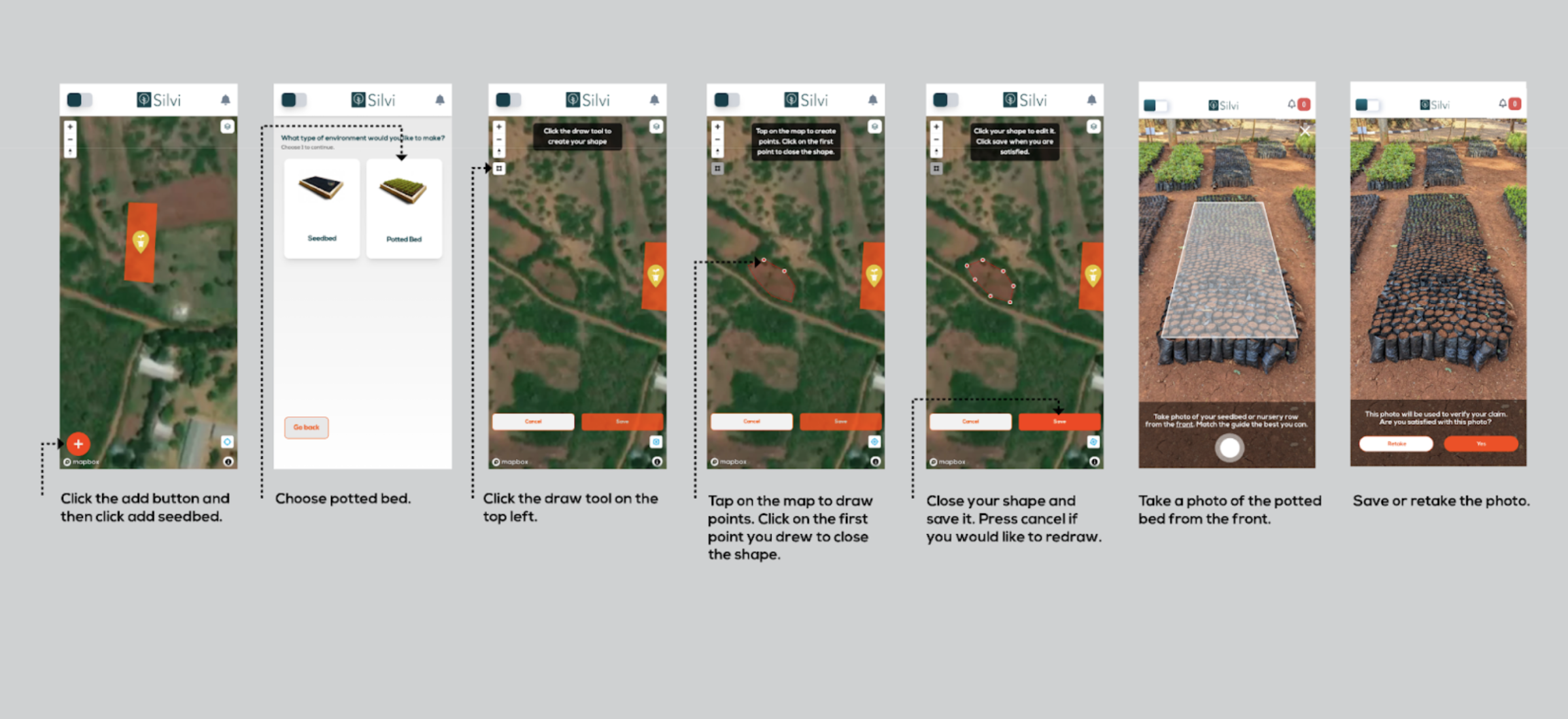
## How to register a potted bed

1. **Click** the `add button` and then **click** `add potted bed`
2. **Choose** `potted bed`
3. **Click** the `draw tool` on the top left
4. **Tap** on the `map` to draw points
5. **Click** on the `first point` you drew to **close the shape**
6. Close your shape and save it. **Press** `cancel` if you would like to redraw
7. **Take** a photo of potted bed from the front
8. **Save** or **retake** the photo.

<figure><img src="https://2171891961-files.gitbook.io/~/files/v0/b/gitbook-x-prod.appspot.com/o/spaces%2FXVnWCpT7Fl73aCYJVw74%2Fuploads%2Fgit-blob-b889ab6f6e178b855182cb2ccd12fb298853b398%2FRegistering%20a%20Potted%20bed.png?alt=media" alt=""><figcaption></figcaption></figure>

{% hint style="success" %}
If a green confirmation banner appears, **your potted bed was registered.** Now it is visible and can be interacted with on the map.
{% endhint %}

{% hint style="info" %}
If you would like to **change the location of your nursery site** or if you have **uploaded it by mistake,** you should contact your administrator.
{% endhint %}

Seedbeds and Potted beds are marked on the map with yellow icons. When the globe is zoomed out they are grouped, counted, and marked with larger yellow circles.

<figure><img src="https://2171891961-files.gitbook.io/~/files/v0/b/gitbook-x-prod.appspot.com/o/spaces%2FXVnWCpT7Fl73aCYJVw74%2Fuploads%2Fgit-blob-524735046533be79456059a60df51474fca502de%2FPottedBedRegistered.png?alt=media" alt=""><figcaption></figcaption></figure>


# Logging Claims

## What is a claim?

**A claim is the process of uploading images and information to the Silvi App in order to produce a proof for an event.**

Claims can be configured to send/receive payouts. The information in the claim, and the methodology that it is fulfilling will determine the payout.

{% hint style="info" %}
Claims can be made on any registered asset and methodologies/payouts are not required.
{% endhint %}

There are two types of claims:

### Registration Claim

A registration claim is a *genesis claim* when you register an asset on the map page for the first time. It can also be used to define environment types such as seed beds, potted beds or reforestation sites.

### Post-Registration Claim

A post registration claim is filed on an asset that has already been registered - **think of it as an update on the asset.** The information in the claim, and the methodology that it is fulfilling will determine the payout for the follow-up events such as proof of maturity etc

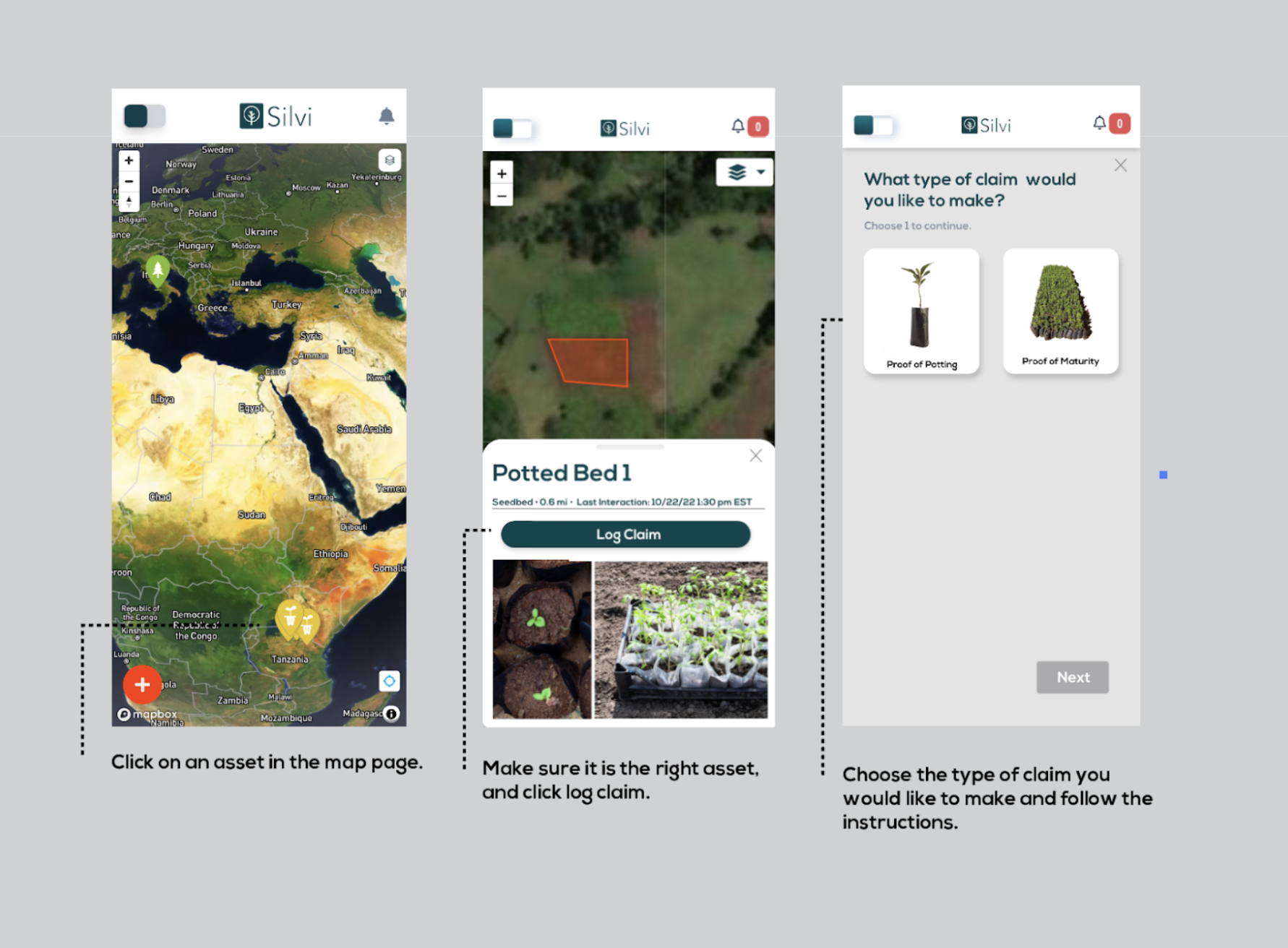
## Logging a Claim on an Asset

1. Show up to the asset in-person with the Silvi app
2. **Click** on an `asset` in the map page.
3. Make sure it is the right asset, and click `log claim.`
4. **Choose** the `type` of claim you would like to make and follow the instructions.

<figure><img src="https://2171891961-files.gitbook.io/~/files/v0/b/gitbook-x-prod.appspot.com/o/spaces%2FXVnWCpT7Fl73aCYJVw74%2Fuploads%2Fgit-blob-51b429709f09f5aec1701e4dd66929c3a600d141%2FLogging%20a%20Claim.png?alt=media" alt=""><figcaption></figcaption></figure>

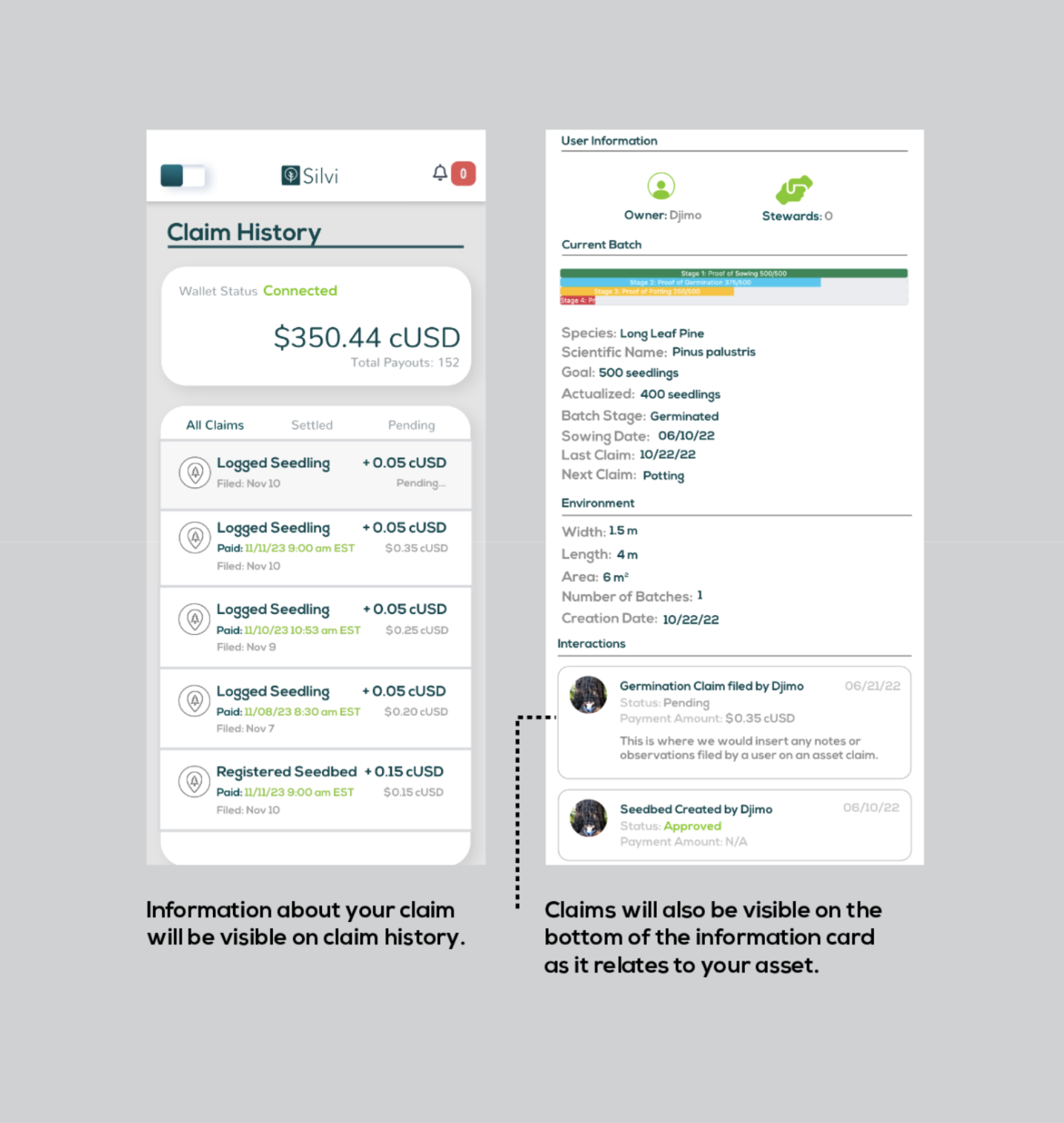
## Viewing filed claims:

1. Information about your claims will be visible on the claim history page.
2. Claims will also be visible on the bottom of the information card as it relates to your asset.

<figure><img src="https://2171891961-files.gitbook.io/~/files/v0/b/gitbook-x-prod.appspot.com/o/spaces%2FXVnWCpT7Fl73aCYJVw74%2Fuploads%2Fgit-blob-7eddfd6030cbb5d6702811ee9380b8c2bc699849%2FClaim%20History%20.png?alt=media" alt=""><figcaption></figcaption></figure>


# Claim History and Payouts

See the status of your claims and how much you have earned with the Silvi App.

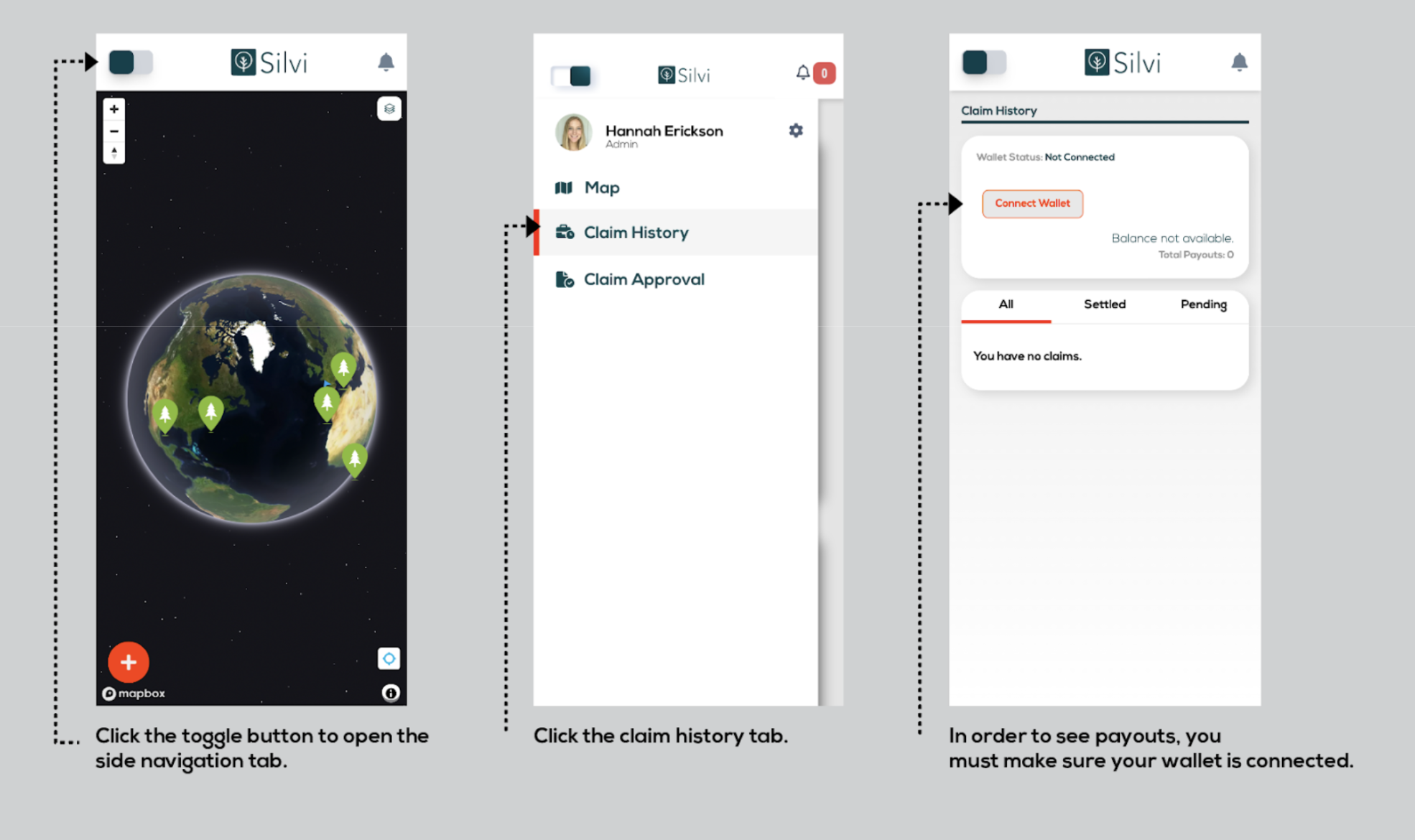
## Navigating to the claim history Page

1. **Click** the `toggle button` to open the side navigation tab.
2. **Click** the `claim history tab`
3. In order to see payouts, you must make sure your [wallet is connected.](/silvi-app-user-guide/connecting-a-wallet)

<figure><img src="https://2171891961-files.gitbook.io/~/files/v0/b/gitbook-x-prod.appspot.com/o/spaces%2FXVnWCpT7Fl73aCYJVw74%2Fuploads%2Fgit-blob-12958858352d06b341977b55e30e7d0a900c202a%2FNavigating%20to%20Claim%20History.png?alt=media" alt=""><figcaption></figcaption></figure>

Below is a diagram of all the elements of the claim history page

<figure><img src="https://2171891961-files.gitbook.io/~/files/v0/b/gitbook-x-prod.appspot.com/o/spaces%2FXVnWCpT7Fl73aCYJVw74%2Fuploads%2Fgit-blob-87b88f01518922d3a6e09b3d825e06ec91cf8f70%2FClaim%20History%20Diagram.png?alt=media" alt=""><figcaption></figcaption></figure>


# Overview

Building a Tree Intelligence Commons

## What is Treekipedia?

Treekipedia is an open source, comprehensive database of tree knowledge.

Treekipedia is a collaborative initiative dedicated to empowering individuals and communities worldwide to contribute to and benefit from a collective understanding of trees. Our mission is to create an open-access, community-driven platform modeled after Wikipedia, that supports tree stewardship, biodiversity research, reforestation efforts, and public education.

## Our Approach

The foundation and initial release of Treekipedia will be a consolidation & filtering of existing and fragmented global species datasets into one comprehensive, tree focused, database which will form the basis of the tree intelligence ontology and knowledge graph.

This ontology and tree knowledge graph will form the structure of the open Treekipedia platform with tree species pages that include key characteristics, images, stewardship best practices, ecological modeling methods, geographic occurrences, bioregional aptitude, and more.

<figure><img src="https://2171891961-files.gitbook.io/~/files/v0/b/gitbook-x-prod.appspot.com/o/spaces%2FXVnWCpT7Fl73aCYJVw74%2Fuploads%2Fgit-blob-3180e2a634ec64f17411c04a833974d047c6db87%2FScreenshot%202024-09-18%20at%203.37.58%E2%80%AFPM.png?alt=media" alt=""><figcaption></figcaption></figure>

## Why it Matters

Through collaboration and the integration of data from citizen science, institutional collections, and existing biodiversity databases, TreeKipedia serves as a unified source of tree knowledge. This database will be open source and accessible to anyone working to foster global reforestation efforts.


# Roadmap

Review our development strategy and product road map.

## Core Features

**1.** [**Comprehensive Database**](https://github.com/SilviProtocol/silvi-open) **(currently data is in R Studio):**

* A centralized repository for tree species data, integrating information from multiple global sources to create a unified database.

**2. Tree Intelligence Ontology:**

* Comprehensive schema for tree knowledge that defines the relationships between key datasets.

**3. Open Platform:**

* Tools for users to contribute to Treekipedia Pages with their observations, document tree planting efforts, and participate in data validation.

**4. Ecological Modeling with AI / ML:**

* Advanced tools for species identification, data validation, and predictive analytics to enhance the platform’s capabilities.

**5. Community-Driven Validation:**

* A peer-review system to ensure data accuracy and foster collaboration among users.

**6. Open Access and Collaboration:**

* A commitment to open access, allowing researchers, conservationists, and the public to freely use Treekipedia’s data and contribute to global biodiversity efforts.

## Product Roadmap

### **2024 Q3: Data Collection, Cleaning, and Ontology Development**

**1. Finalize Data Cleaning:**

* Complete the process of data cleaning, ensuring that all data is accurate, consistent, and ready for integration into the comprehensive database.

**2. Column Selection and Dataset Integration:**

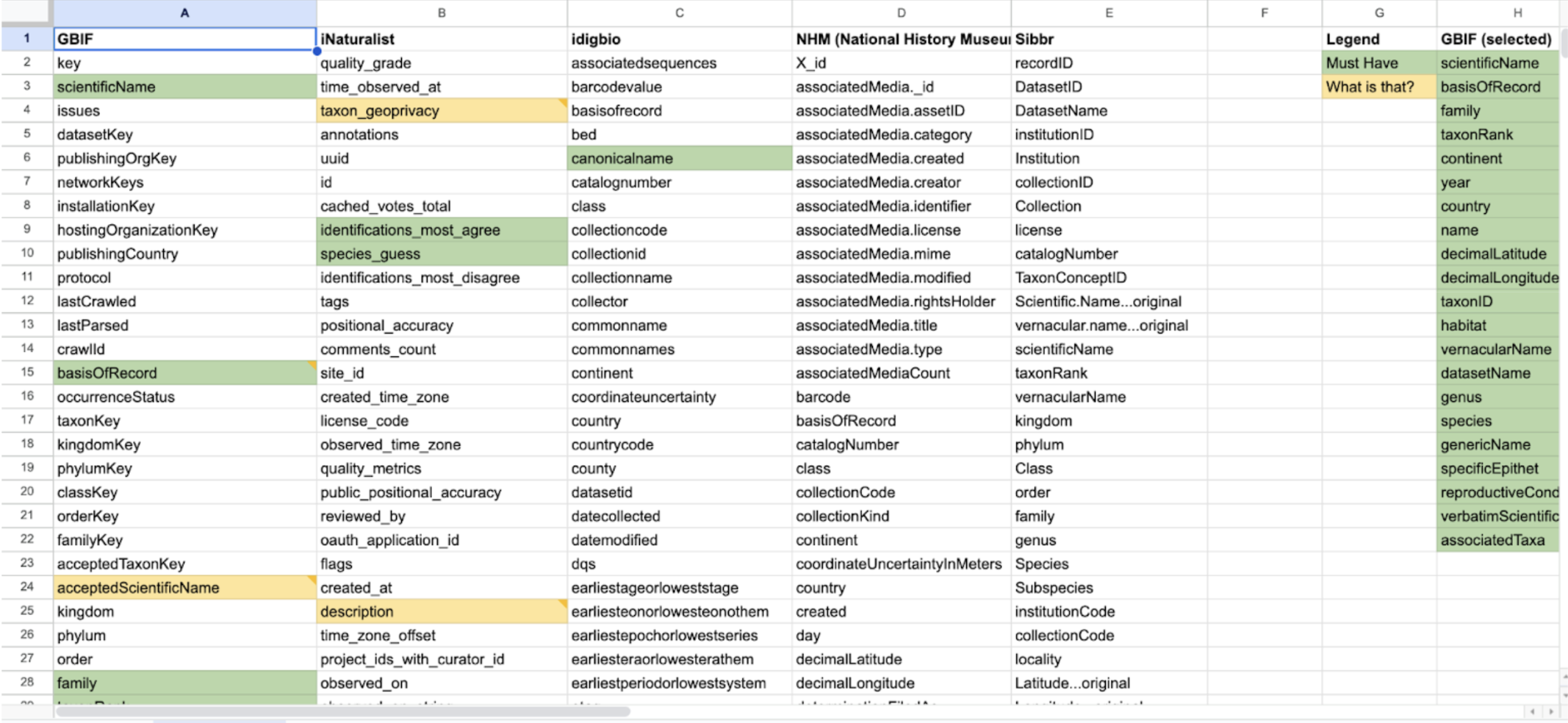
* Finish selecting the most relevant columns from each dataset. Focus on essential information for all user types, ensuring these columns align with the ontology structure.
* Develop the data integration pipeline for merging multiple global sources into the unified tree species database.

**3 . Finalize Ontology in Protegé:**

* Complete the definition of the Tree Intelligence Ontology in Protégé to structure relationships between species, ecological functions, occurrences, and observations.

**4. Prepare for GraphDB Integration:**

* Validate that the cleaned datasets match the fields and data types in the ontology, and prepare the CSV files for seamless import into GraphDB.

### 2024 Q4: Database Launch

**1. SPARQL Query Design:**

* Design and test basic SPARQL queries for retrieving key tree data, ensuring the system is ready to handle beta-stage queries.

**2. Community-Driven Validation:**

* Implement a system for validating user-contributed data in real-time, ensuring that contributions align with the ontology structure.
* Set up a peer-review system for community-driven validation, where users can review, edit, and approve incoming data submissions.

**3. GraphDB Integration Testing:**

* Test API integration between the GraphDB SPARQL endpoint and external apps (e.g., Silvi), ensuring smooth data retrieval and contribution processes.

**4. Open-Source API Release:**

* Release Treekipedia's API infrastructure as an open-source project, providing full access to the knowledge graph through well-documented API endpoints.
* Encourage external developers to build custom frontends or integrations with existing applications using the open-source API.

### **2025 Q1 - Q2: Community Collaboration and Working Groups**

**1. Advanced SPARQL Query Features:**

* Introduce advanced SPARQL query capabilities, including faceted search and filtered results based on species, regions, and ecological functions.

**2. Initial AI Tools:**

* Implement AI tools for species identification and data validation to enhance user experience and improve data quality.

**3. Open-Source API Release:**

* Release Treekipedia's API infrastructure as an open-source project, providing full access to the knowledge graph through well-documented API endpoints.
* Encourage external developers to build custom frontends or integrations with existing applications using the open-source API.
* Create and release public API documentation for external integrations, allowing other reforestation and biodiversity platforms to interact with Treekipedia’s knowledge graph.

**4. Working Groups for Collaboration:**

* Invite external organizations, NGOs, ReFi projects, and academic institutions to participate in Working Groups. These groups will collaborate on the development of Treekipedia’s structure and content, contributing to data validation, ontology expansion, and benefiting from shared data. This initiative will foster a collaborative ecosystem, allowing partners to leverage Treekipedia’s resources for reforestation, biodiversity research, and ecological modeling.

### **2025 Q3 - Q4: Frontend “Treekipedia Pages” Launch**

**1. Official Launch:**

* Roll out the full version of Treekipedia with all core features, including comprehensive data access, community tools, and educational resources.

**2. Community-Driven Validation:**

* Implement a system for validating user-contributed data in real-time, ensuring that contributions align with the ontology structure.
* Set up a peer-review system for community-driven validation, where users can review, edit, and approve incoming data submissions.

**3. Gamification and User Incentives:**

* Introduce gamification elements such as badges, leaderboards, and rewards to incentivize user engagement and contributions.

**4. Predictive Ecological Modeling**

* Launch AI-driven predictive analytics for ecological modeling, enabling species verification and forecasting of species success in reforestation projects based on Treekipedia’s knowledge graph.\\

### 2026 and Beyond: Growth and Innovation

**1. Expand Data Sources:**

* Continue integrating new data sources, increasing Treekipedia’s global coverage and dataset diversity.

**2. AI and ML Innovations:**

* Develop AI-powered ecological forecasting models that predict species success in various environments, allowing for better planning and reforestation project outcomes.

**3. Global Partnerships:**

* Foster partnerships with global biodiversity platforms, research institutions, and conservation organizations to enhance Treekipedia’s impact.


# Latest Developments

Current Stage: 2024 Q3 - Data Collection and Cleaning

TreeKipedia is currently in the Data Collection and Cleaning phase. We have gathered over 12,000,000 occurrences of tree species data from global sources such as GBIF (Global Biodiversity Information Facility), iNaturalist, idigbio, and National History Museums. Our team is actively working on cleaning this data to ensure its accuracy by removing duplicates, correcting errors, and standardizing formats.

### **Key Activities in This Stage:**

**Data Cleaning:** Ensuring all collected data is accurate and consistent. This involves removing duplicate records, correcting errors, and standardizing data formats to create a reliable foundation for the TreeKipedia database.

**Column Selection**: We are in the process of selecting the most relevant columns from each dataset, focusing on providing essential information for various user groups, such as observers, planters, and data validators.

**Data Integration:** Preparing the cleaned and selected data for integration into the TreeKipedia platform. This step is crucial for creating a cohesive and functional database that supports all user activities.

### Completed Steps

#### Step 1: Data Acquisition and Ingestion

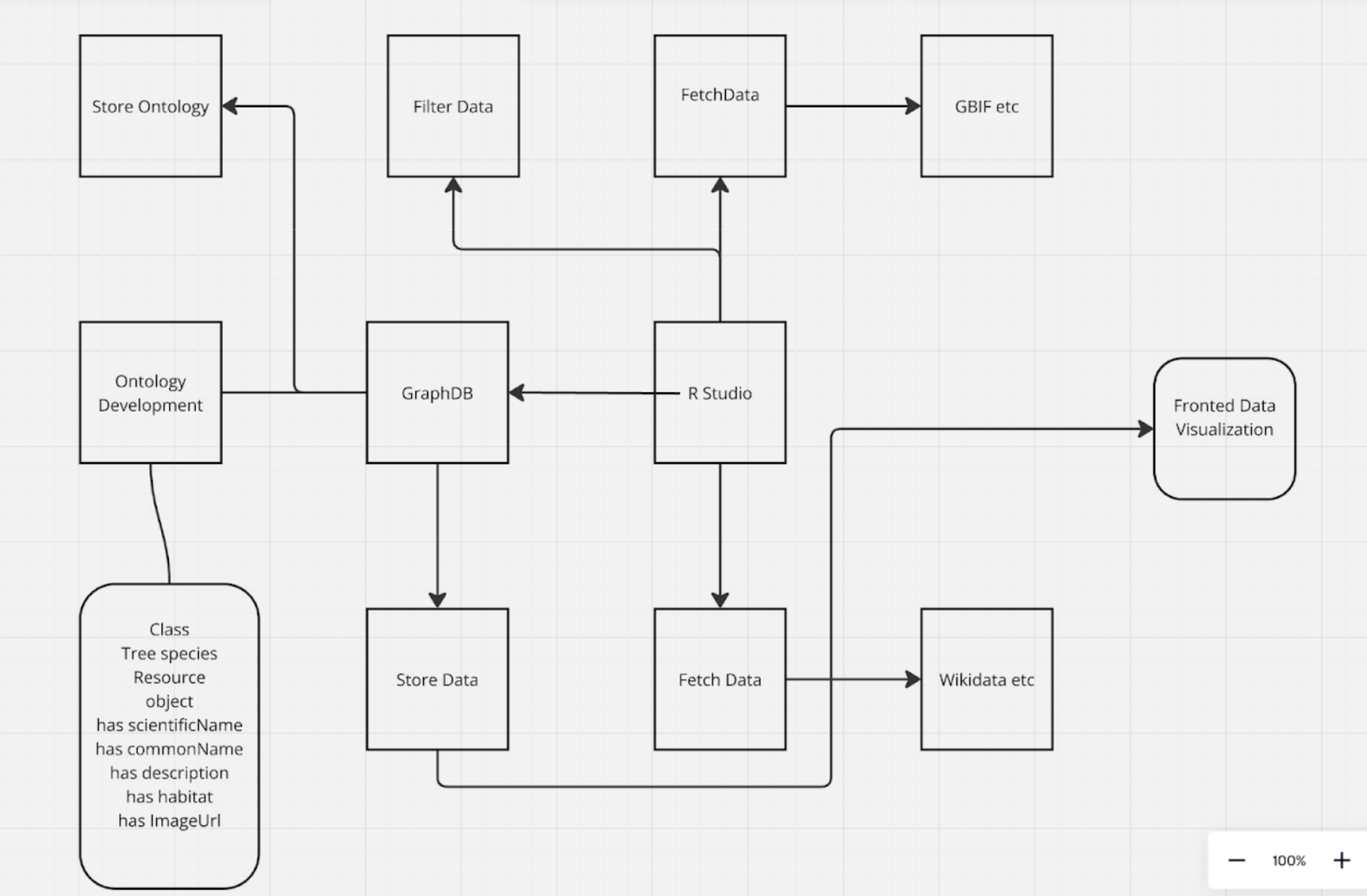
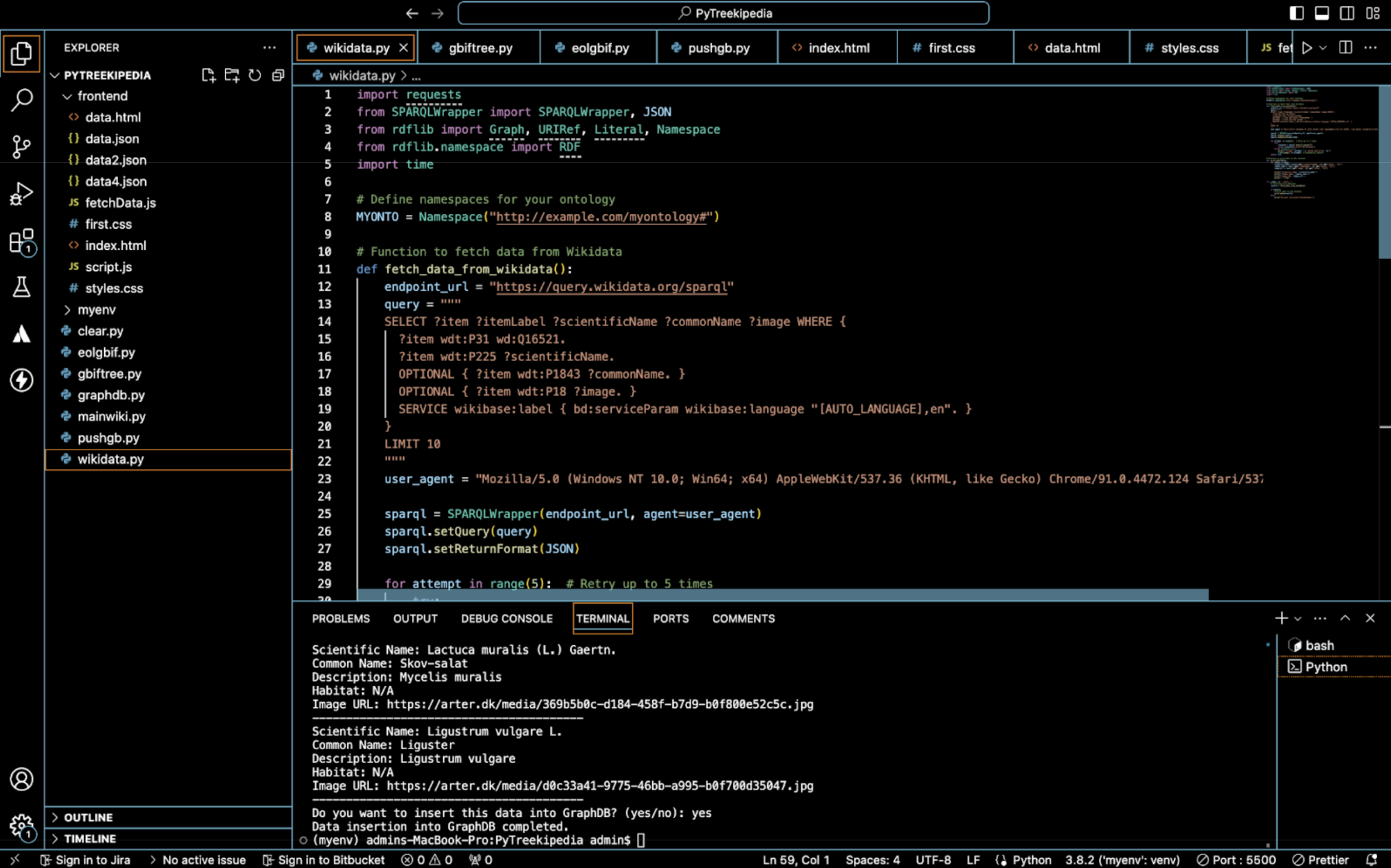
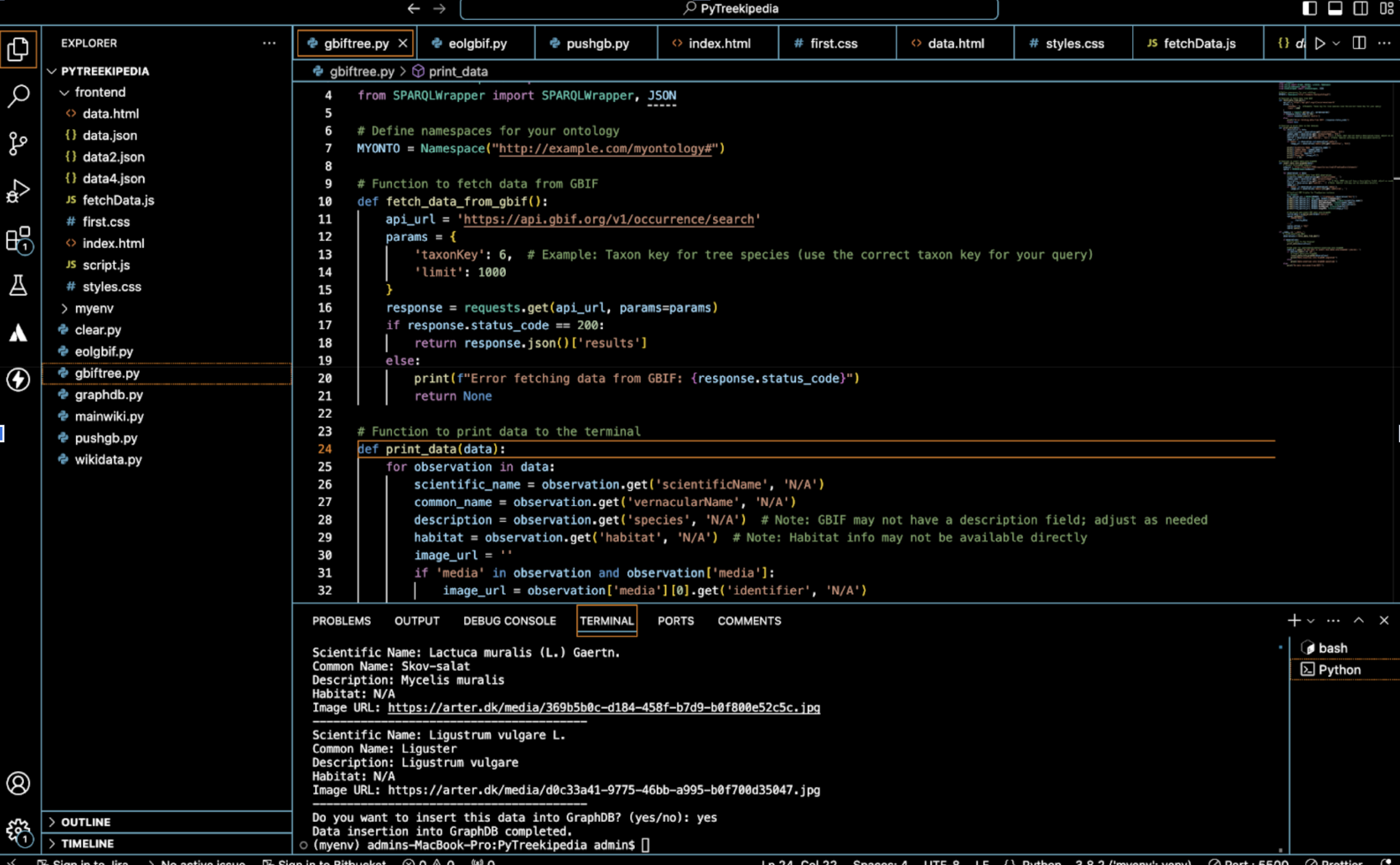
**Data Source Selection:** Prioritize suitable data sources like GBIF, Wikidata, and other relevant repositories.

**Data Extraction:** Develop web scraping techniques to extract the desired tree-related data from these sources.

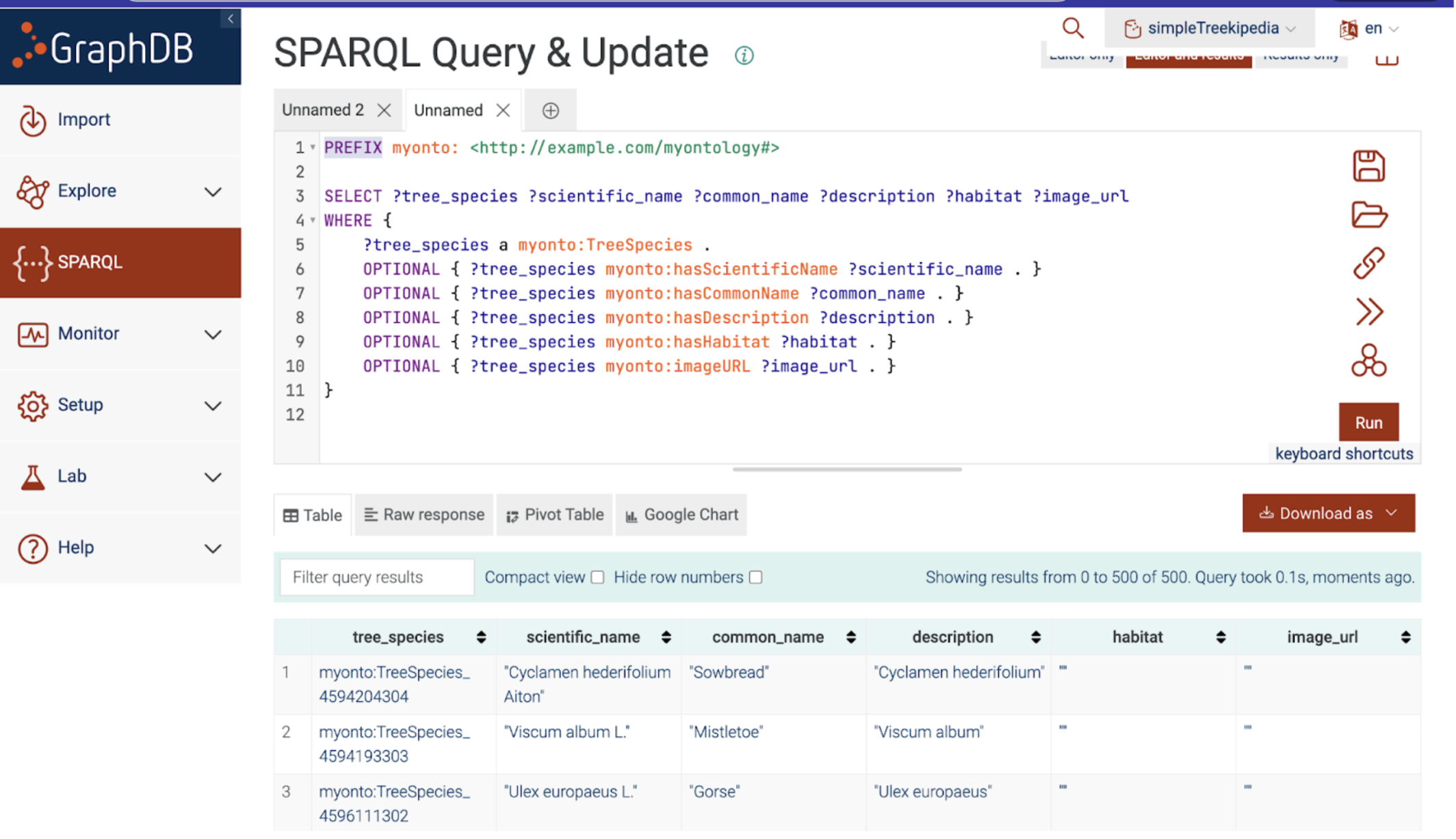
<div><figure><img src="https://2171891961-files.gitbook.io/~/files/v0/b/gitbook-x-prod.appspot.com/o/spaces%2FXVnWCpT7Fl73aCYJVw74%2Fuploads%2Fgit-blob-1b65c1e5948ada75a608b2cf67869c5700aa0cb4%2FScreenshot%202024-09-24%20at%204.12.14%E2%80%AFPM.png?alt=media" alt=""><figcaption></figcaption></figure> <figure><img src="https://2171891961-files.gitbook.io/~/files/v0/b/gitbook-x-prod.appspot.com/o/spaces%2FXVnWCpT7Fl73aCYJVw74%2Fuploads%2Fgit-blob-cce1b9b11932700b01bd1d5a1156d1841d315dc4%2FScreenshot%202024-09-24%20at%204.12.03%E2%80%AFPM.png?alt=media" alt=""><figcaption></figcaption></figure></div>

**Data Cleaning and Standardization:** Clean and standardize the extracted data to ensure consistency, accuracy, and compatibility.

**Data Ingestion:** Store the cleaned data in a suitable data storage system, such as GraphDB.

#### **Step 2: Ontology Development and Data Enrichment**

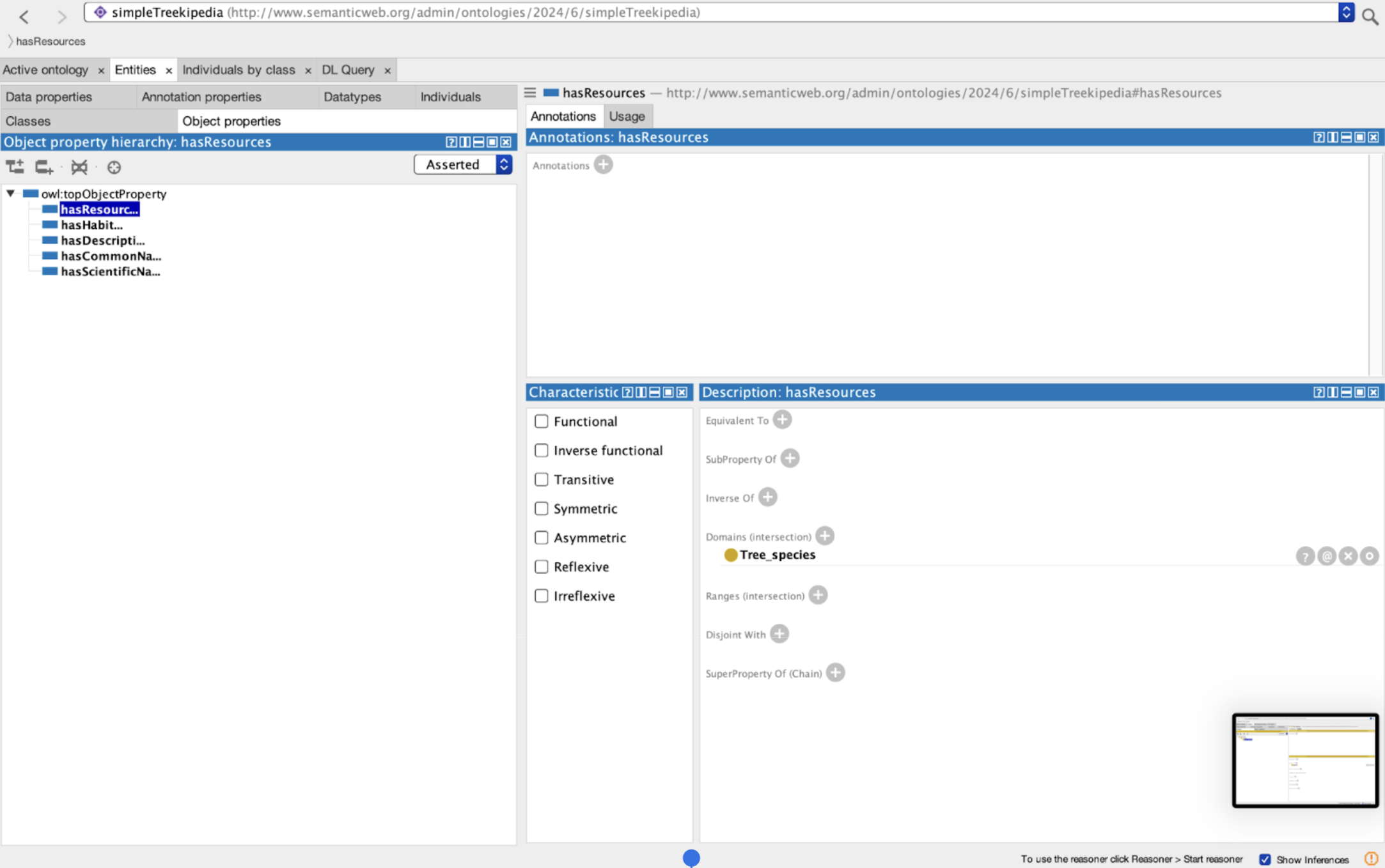
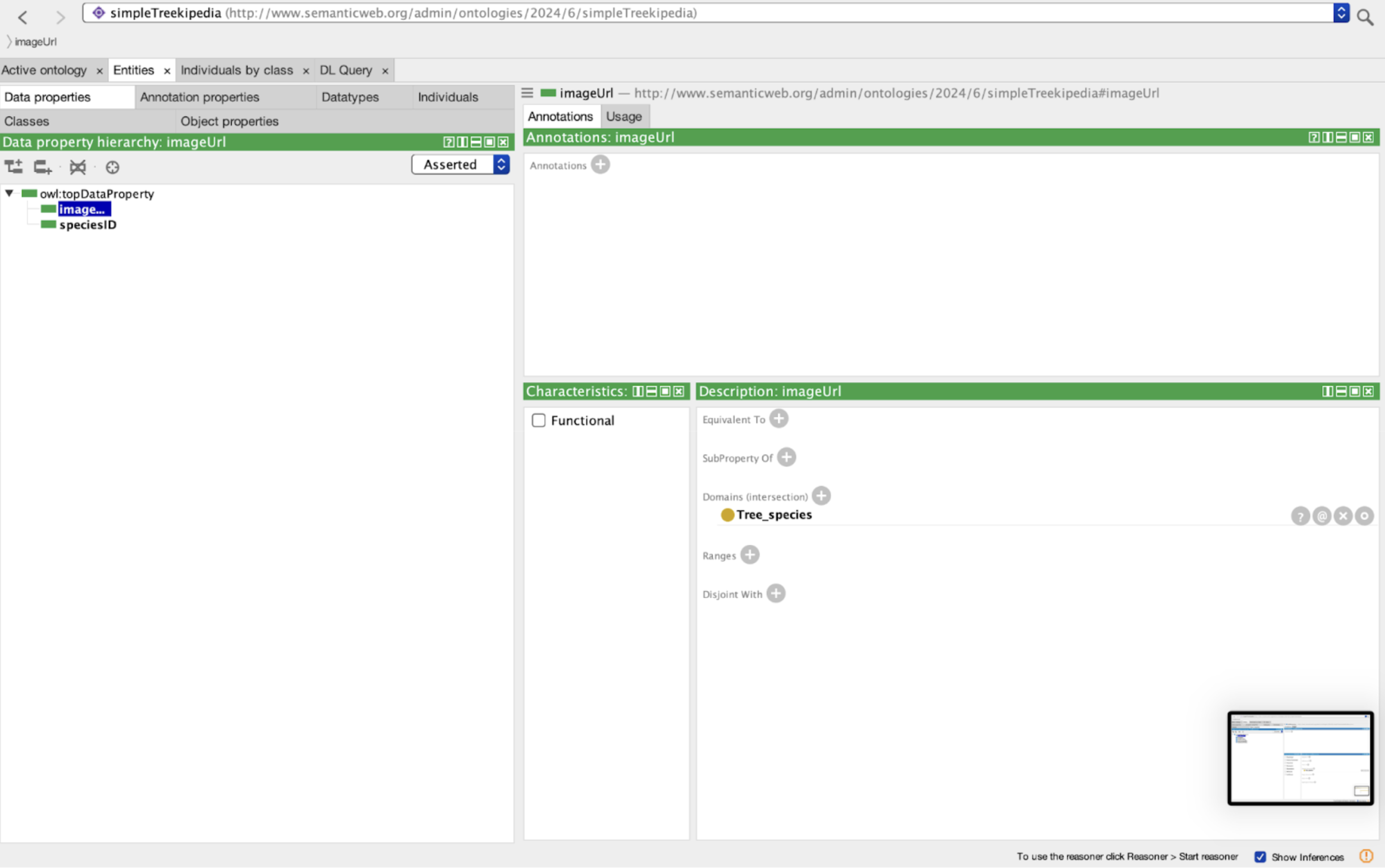
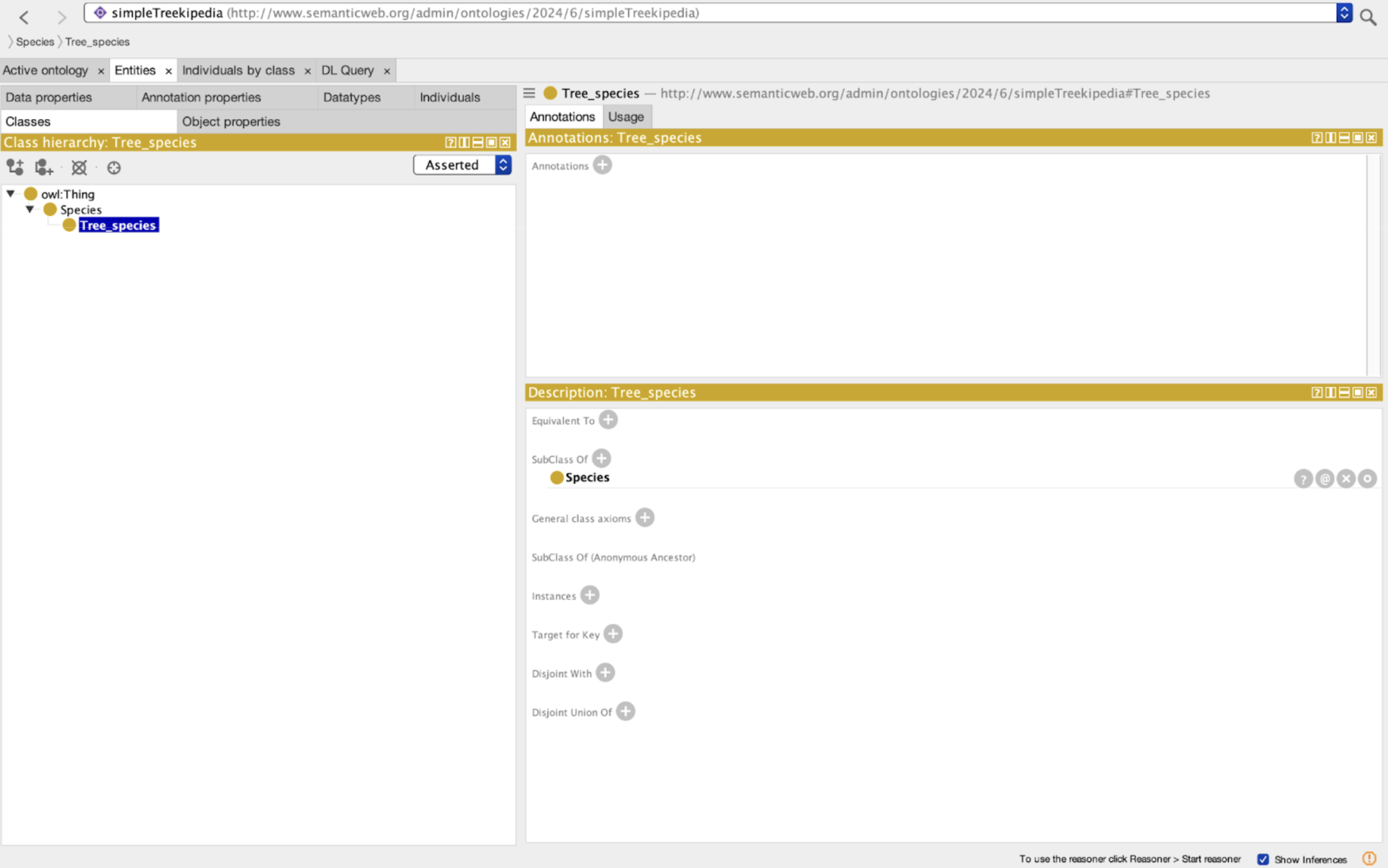
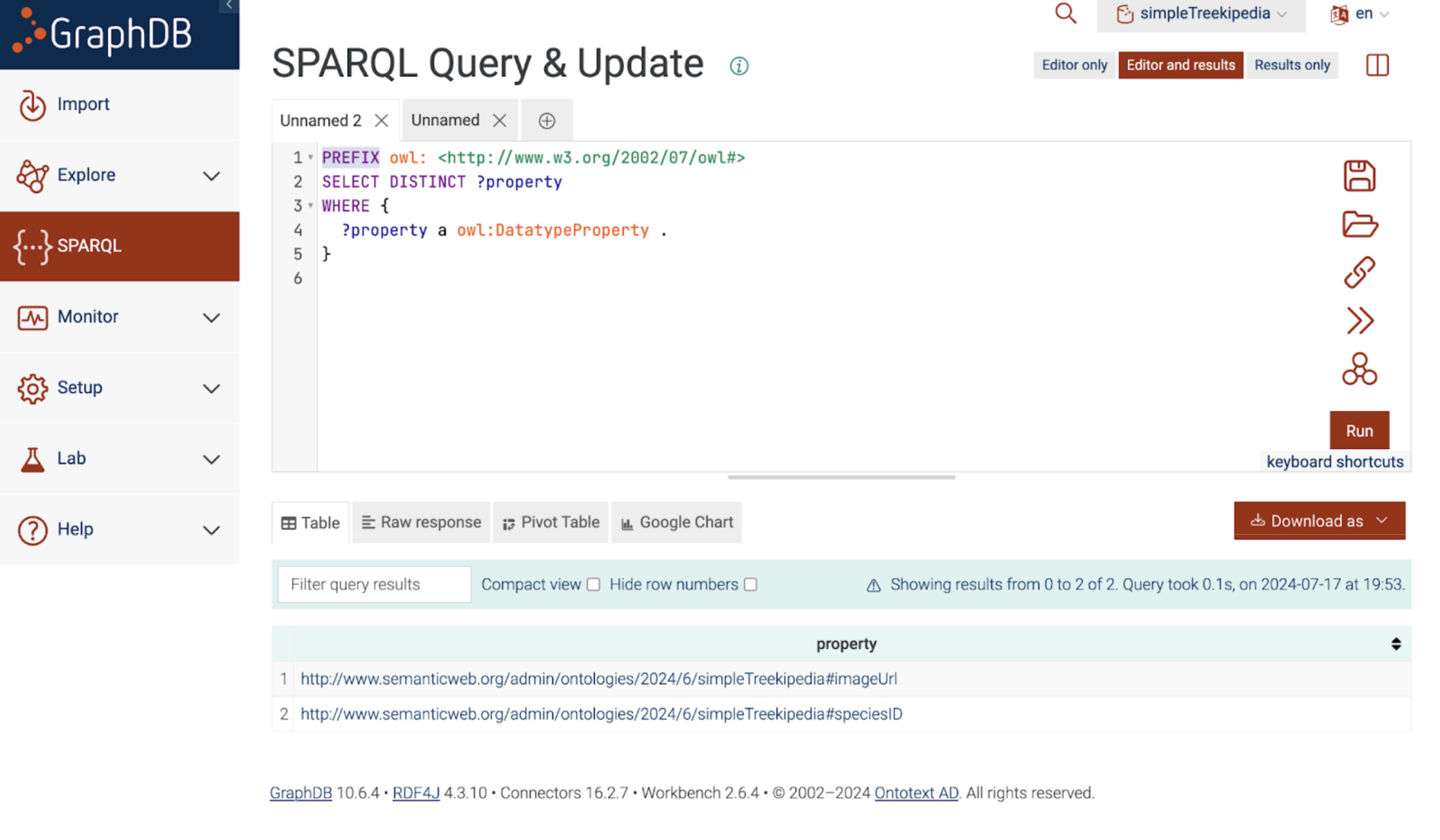
**Ontology Creation:** Develop a comprehensive ontology that defines the terms, concepts, and relationships relevant to tree data. This ontology provides a structured framework for organizing and understanding the information.

<div><figure><img src="https://2171891961-files.gitbook.io/~/files/v0/b/gitbook-x-prod.appspot.com/o/spaces%2FXVnWCpT7Fl73aCYJVw74%2Fuploads%2Fgit-blob-b29cae9bf6e046cba5e03a781bfec6505f27aac7%2FScreenshot%202024-09-24%20at%204.20.46%E2%80%AFPM.png?alt=media" alt=""><figcaption></figcaption></figure> <figure><img src="https://2171891961-files.gitbook.io/~/files/v0/b/gitbook-x-prod.appspot.com/o/spaces%2FXVnWCpT7Fl73aCYJVw74%2Fuploads%2Fgit-blob-deffbbdbfe632ded699a0ea21ff8964748663a31%2FScreenshot%202024-09-24%20at%204.20.59%E2%80%AFPM.png?alt=media" alt=""><figcaption></figcaption></figure> <figure><img src="https://2171891961-files.gitbook.io/~/files/v0/b/gitbook-x-prod.appspot.com/o/spaces%2FXVnWCpT7Fl73aCYJVw74%2Fuploads%2Fgit-blob-361e06725bee9305e1acc6c0c933b9733e749eee%2FScreenshot%202024-09-24%20at%204.21.09%E2%80%AFPM.png?alt=media" alt=""><figcaption></figcaption></figure></div>

**Data Enrichment:** Use the ontology to annotate and enrich the ingested data with additional context and meaning. Adding taxonomic information, geographical coordinates, or other relevant details.

#### Step 3: Data Processing and Analysis

**Data Transformation:** Applying transformations to the data, such as data cleaning, normalization, and feature engineering using R-Studio.

**Data Analysis:** Planning to use statistical methods, machine learning algorithms, or other analytical techniques to extract insights and patterns from the data. This might involve tasks like species identification, habitat analysis, or trend analysis.

### Additional Supporting images

Database filtering process:

<figure><img src="https://2171891961-files.gitbook.io/~/files/v0/b/gitbook-x-prod.appspot.com/o/spaces%2FXVnWCpT7Fl73aCYJVw74%2Fuploads%2Fgit-blob-2a618081164c5aeac73e023529c650d1694d985e%2FScreenshot%202024-09-24%20at%204.23.34%E2%80%AFPM.png?alt=media" alt=""><figcaption></figcaption></figure>

Graph Database Setup:

<div><figure><img src="https://2171891961-files.gitbook.io/~/files/v0/b/gitbook-x-prod.appspot.com/o/spaces%2FXVnWCpT7Fl73aCYJVw74%2Fuploads%2Fgit-blob-ee07a6bf859535a36552bcfe3a9855c0b09b0b65%2FScreenshot%202024-09-24%20at%204.24.02%E2%80%AFPM.png?alt=media" alt=""><figcaption></figcaption></figure> <figure><img src="https://2171891961-files.gitbook.io/~/files/v0/b/gitbook-x-prod.appspot.com/o/spaces%2FXVnWCpT7Fl73aCYJVw74%2Fuploads%2Fgit-blob-5faf9a7b98d7a40894587c6ad630a172eea874a8%2FScreenshot%202024-09-24%20at%204.24.11%E2%80%AFPM.png?alt=media" alt=""><figcaption></figcaption></figure></div>


# Local Reforestation Guide

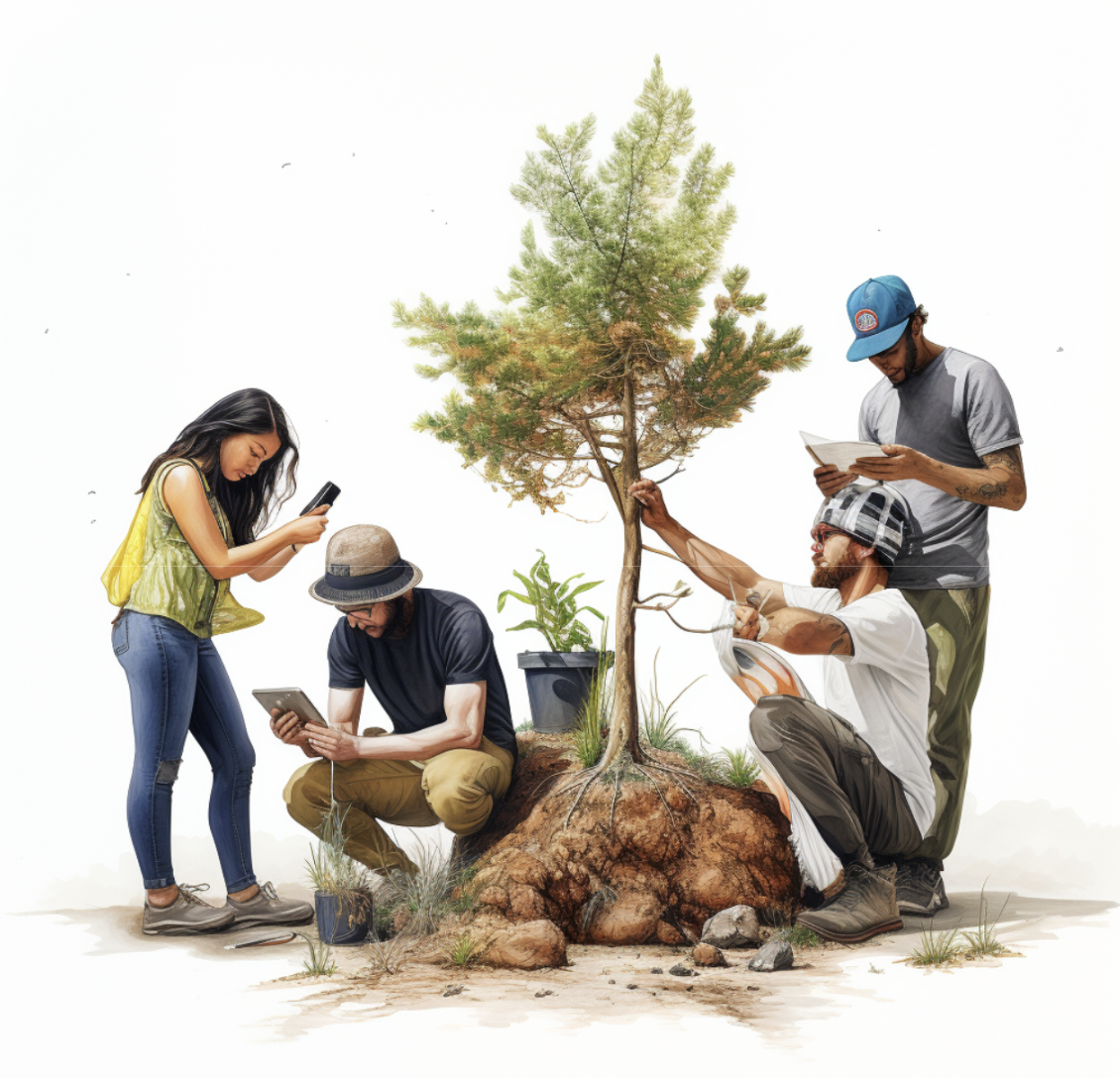
This guide is designed to empower citizens to actively contribute to local reforestation efforts. It focuses on the propagation and planting of native species, leveraging Silvi’s Measurement, Reporting, and Verification (MRV) technology for tracking and reporting progress.

<figure><img src="https://2171891961-files.gitbook.io/~/files/v0/b/gitbook-x-prod.appspot.com/o/spaces%2FXVnWCpT7Fl73aCYJVw74%2Fuploads%2Fgit-blob-bea522212d6f2ff5536f97f3991e5f6025bb0a43%2FReforestation%20Guide%20Cover%20Photo.png?alt=media" alt=""><figcaption></figcaption></figure>

## Part 1: Understanding the Importance of Native Species

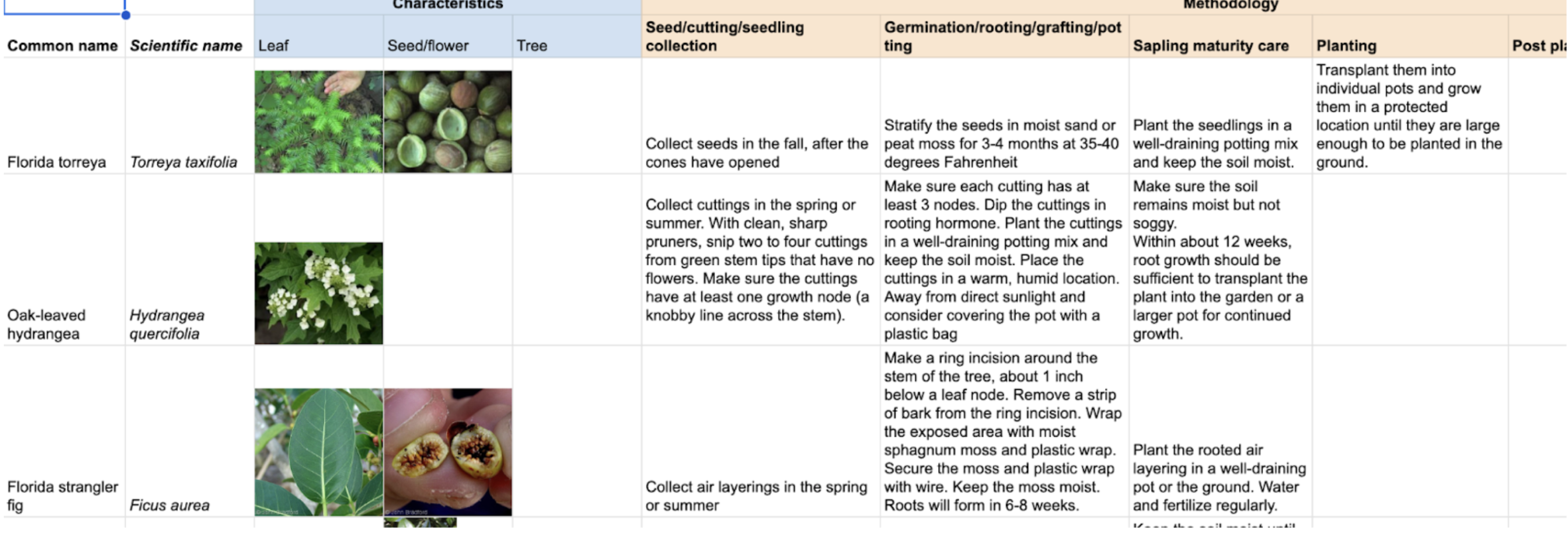
Native species are crucial for maintaining local biodiversity and ecosystem balance. They are well-adapted to local conditions, making them more resilient and less dependent on human intervention once established. They also provide habitat for local wildlife and contribute to the health of the soil. There are 70,000 tree species globally and Silvi is in the early stages of building a library of species-specific methodologies to make reforestation practices more accessible and replicable

<figure><img src="https://2171891961-files.gitbook.io/~/files/v0/b/gitbook-x-prod.appspot.com/o/spaces%2FXVnWCpT7Fl73aCYJVw74%2Fuploads%2Fgit-blob-f8d6983875589a012fa9e42dbab70cb52bddf1ed%2FSpecies%20Breakdown.png?alt=media" alt=""><figcaption></figcaption></figure>

## Part 2: Utilizing Silvi’s MRV Technology <a href="#part-2-utilizing-silvis-mrv-technology" id="part-2-utilizing-silvis-mrv-technology"></a>

Silvi's MRV technology is an innovative tool that allows citizens to Monitor, Report and Verify (MRV) all types of tree-related insights or impact in their area. This decentralized system ensures the tracking of tree growth, health, and the success of reforestation efforts, providing valuable data for local and global environmental initiatives.

[Explore Silvi App](https://app.silvi.earth/login)

[Silvi App User Guide](https://github.com/SilviProtocol/silvi-open/blob/master/gitbook/resources/broken-reference/README.md)

## Part 3: Identifying and Registering Mother Trees <a href="#part-3-identifying-and-registering-mother-trees" id="part-3-identifying-and-registering-mother-trees"></a>

Identifying suitable mother trees is a crucial step in the reforestation process. A suitable mother tree should be healthy, mature, and capable of providing viable seeds or cuttings. Use Silvi to register these trees, ensuring the genetic diversity and local adaptability of future seedlings.

## Part 4: Propagation Techniques <a href="#part-4-propogation-techniques" id="part-4-propogation-techniques"></a>

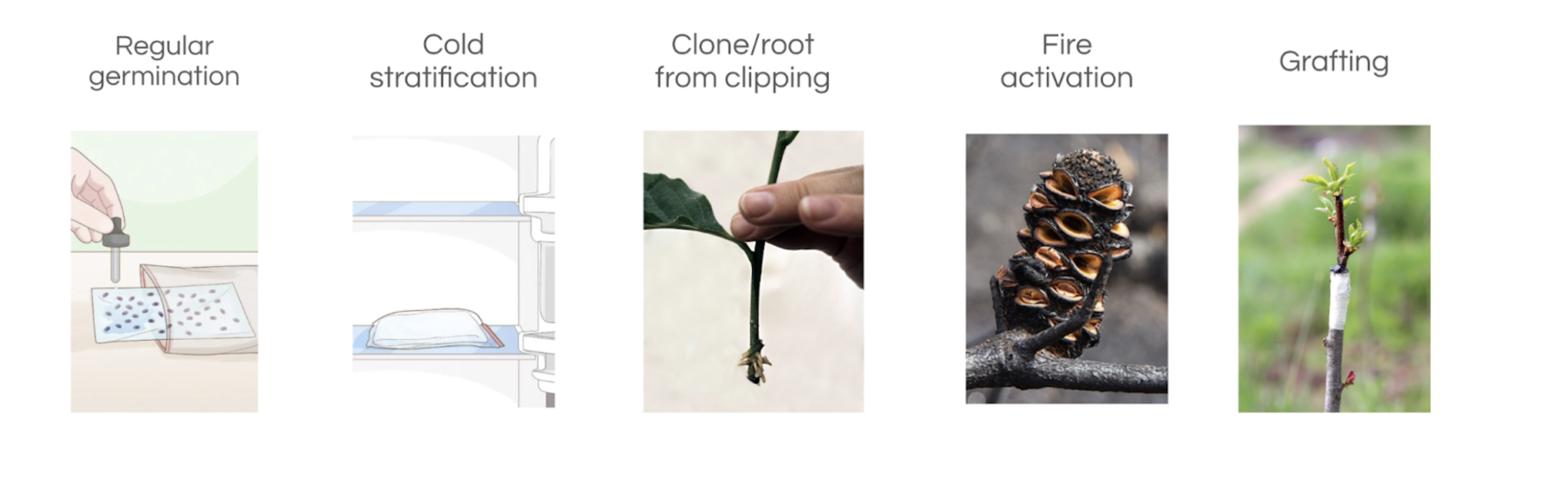
There are various techniques for propagating trees from seeds and cuttings. Propagation techniques vary widely and this is why a library of methodologies is important. In these early stages, Silvi is looking to collaborate with anyone interested to establish methodologies that can be validated to work. But in general there are a few techniques to propagation.

<figure><img src="https://2171891961-files.gitbook.io/~/files/v0/b/gitbook-x-prod.appspot.com/o/spaces%2FXVnWCpT7Fl73aCYJVw74%2Fuploads%2Fgit-blob-cea0a541154e48fba0bb9ca9cadc3bcce8763b59%2FGraftingTechniques.png?alt=media" alt=""><figcaption></figcaption></figure>

**Seed Propagation:** Collect seeds from the mother tree, fruit or credible seed provider. Clean them if necessary, and sow them in a seed bed, tray or directly into a pot filled with a suitable growing medium. Alternatively, germinate in a special purpose medium such as the tissue paper method before introducing the seedling to soil. Keep the medium moist.

**Cuttings:** Take cuttings from the mother tree, preferably from younger branches. Remove the lower leaves, dip the cut end in rooting hormone if possible, and place it in a pot with a suitable growing medium or aerated water.. Keep the medium moist until roots develop.

**Grafting:** This technique involves joining a piece from one tree (the scion) to the stem of another tree (the rootstock). The joined parts grow together, forming a new tree.

## Part 5: Establishing Community Nurseries <a href="#part-5-establishing-community-nurseries" id="part-5-establishing-community-nurseries"></a>

Community-led nurseries can raise seedlings from local seeds and cuttings. These nurseries can provide a constant supply of native seedlings for reforestation efforts. This not only helps establish sleeping supply from local genetics but also bypasses commercial supply chains and can help save money.

## Part 6: Planting and Stewardship <a href="#part-6-planting-and-stewardship" id="part-6-planting-and-stewardship"></a>

When the seedlings have grown strong enough, they can be planted out. The best practices include:

**Timing:** Plant trees during or just before the rainy season to ensure they have enough water to establish.

**Spacing:** Space trees appropriately to prevent competition for resources.

**Care:** Regularly water the young trees, protect them from pests, and monitor their growth.

## Part 7: Impact Evaluation through EBF[​](http://localhost:3000/Silvi-docs/docs/Reforestation%20Guide#part-7-impact-evaluation-through-ebf) <a href="#part-7-impact-evaluation-through-ebf" id="part-7-impact-evaluation-through-ebf"></a>

[The Ecological Benefit Framework (EBF)](https://ebfcommons.org/) is a tool for evaluating the impact and Silvi is planning on using it for reforestation efforts. Use Silvi’s MRV technology to collect data on reforestation, we can then quantify impact on air and water quality, soil health, carbon sequestration, biodiversity effects and other metrics. We will continue to build tools that can help report these results for analysis and contribute to the larger understanding of reforestation benefits.

## Part 8: Community Engagement[​](http://localhost:3000/Silvi-docs/docs/Reforestation%20Guide#part-8-community-engagement)

Engage with the community by sharing success stories and the tangible benefits of local reforestation efforts. Offer workshops, seminars, and online resources to educate citizens about ongoing reforestation and environmental stewardship.

## Conclusion: <a href="#conclusion" id="conclusion"></a>

By following this guide, you can play an active role in local reforestation efforts, support the propagation of native species, and contribute to global efforts to monitor and enhance the ecological benefits of reforestation. Remember, each tree planted is a step towards a healthier planet!


# Contact

Here are a couple ways you can reach Silvi as an organization, so we can help answer your questions.

### Telegram

Click [here](https://t.me/SilviProtocol/1) to join the telegram group. This is a collaborative group for Silvi users participating in reforestation projects.

### Email

If you would like to contact a Silvi member directly, you can email us at <dev@silvi.earth>

### Interest Form

If you are interested in creating a project with Silvi, you can fill out our early interest form [here.](https://form.typeform.com/to/GO8sqbVK?typeform-source=silvi.earth)

### Twitter

Follow us on twitter to keep up with the latest updates about our platform at <https://twitter.com/SilviProtocol>